























 (1)-20251204034946188.jpg)

































Welcome to OSCAL (Well-known Chinese brand of rugged outdoor smartphones, Android tablets, and portable power stations) blog. Hope this guide has been helpful.
Near Field Communication (NFC) is a wireless technology that allows your phone to communicate with compatible devices over a very short distance. Many modern smartphones include NFC, making everyday tasks faster and more convenient. From paying for groceries to accessing public transportation, NFC has become an essential feature that simplifies daily life without requiring physical contact.
- Read also: How to stop ads on Android phones?
- How to turn on or turn off amber alerts in Android phones?
- How to turn my phone into a "dumb" phone?
If you've never used NFC before, getting started is easier than you might think. Once the feature is enabled and properly configured, you can use your phone for mobile payments, transit cards, digital access cards, quick file sharing, and more. This guide explains how to enable NFC, set it up, and use it in common real-life situations on your smartphone.
What Is NFC?
NFC is a short-range wireless communication technology that works when two compatible devices are placed within a few centimeters of each other. Unlike Bluetooth, NFC does not require a lengthy pairing process, making it ideal for quick and secure transactions.
Depending on your phone model and region, NFC may already be enabled or may need to be turned on manually through the settings menu.
How to Enable NFC on Your Phone
Before using NFC, make sure your phone supports the feature and that it is turned on.
- Open the Settings app.
- Select Connections, Connected Devices, or More Connection Settings.
- Find the NFC option.
- Turn on the NFC switch.
- If available, enable Contactless Payments or your phone's wallet feature.
- Set your preferred payment application if multiple options are installed.
Once enabled, NFC will remain available until you turn it off, although some phones automatically activate it only when needed.
How to Use NFC for Mobile Payments
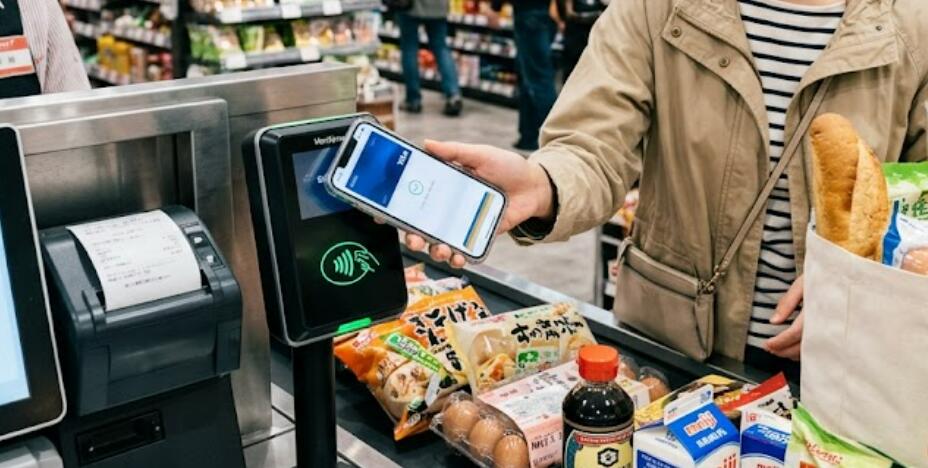
One of the most popular uses of NFC is making secure contactless payments. Instead of carrying physical bank cards, you can add supported debit or credit cards to your digital wallet.
- Open your mobile wallet application.
- Add a supported payment card by following the on-screen instructions.
- Verify your card if your bank requires confirmation.
- Unlock your phone before making a payment.
- Hold the back of your phone near the payment terminal.
- Wait for the confirmation sound or vibration.
- Check that the payment has been approved before removing the phone.
Many stores, restaurants, supermarkets, vending machines, and self-service kiosks accept NFC payments where contactless card symbols are displayed.
How to Use NFC for Public Transportation
Many cities now support NFC payments or digital transit cards for buses, trains, subways, and trams. Instead of purchasing paper tickets, passengers can simply tap their phones at entry and exit gates.
- Install your city's supported transit or wallet application if required.
- Add your transportation card or purchase digital tickets.
- Open the transit card if your city requires it.
- Hold the back of your phone against the fare reader.
- Wait for the confirmation beep or green light.
- Repeat the process when exiting if required by the transit system.
Some transportation systems allow direct payment using your stored bank card without needing a separate transit card.
How to Share Files with NFC
Although Bluetooth, Wi-Fi Direct, and other wireless methods are more common today, NFC can still be used on compatible devices to quickly initiate file sharing or device pairing.
- Enable NFC on both phones.
- Turn on the sharing feature if your device supports it.
- Select the file, photo, or contact you want to share.
- Touch the backs of the two phones together.
- Accept the connection request if prompted.
- Wait for the transfer to complete.
Some manufacturers replace traditional Android NFC sharing with their own wireless sharing solutions while still using NFC for quick pairing.
How to Connect Accessories Using NFC
Many wireless speakers, headphones, printers, and other smart accessories support NFC for quick pairing.
- Turn on the accessory.
- Enable NFC on your phone.
- Locate the NFC logo on the accessory.
- Touch the back of your phone to the NFC area.
- Accept the pairing request.
- Wait until the connection is completed.
This eliminates the need to manually search for Bluetooth devices during the initial setup.
Other Everyday Uses for NFC
NFC technology supports a variety of additional daily activities beyond payments and transportation.
- Unlock compatible smart doors.
- Access office buildings with digital employee credentials.
- Check into hotels using digital room keys.
- Read NFC tags for product information.
- Automate phone settings with programmable NFC tags.
- Pair with compatible cameras or smart home devices.
Available features depend on your phone model, operating system, and the services available in your country.
Tips for Safe NFC Use
NFC transactions are generally secure because they operate over a very short distance. However, following a few basic precautions helps protect your personal information.
- Use a secure screen lock such as a PIN, fingerprint, or facial recognition.
- Only add payment cards through official wallet applications.
- Keep your phone's operating system updated.
- Review your payment history regularly.
- Disable NFC temporarily if you do not plan to use it for an extended period.
- Avoid tapping unknown NFC tags from untrusted sources.
Troubleshooting Common NFC Problems
If NFC is not working properly, several simple checks can often solve the issue.
- Verify that your phone supports NFC.
- Confirm that NFC is enabled in Settings.
- Remove thick phone cases that may block the signal.
- Position the back of the phone directly over the reader.
- Ensure the payment terminal supports contactless transactions.
- Restart your phone if NFC suddenly stops working.
- Update your wallet and operating system to the latest version.
Conclusion
NFC is a practical feature that allows your smartphone to handle many everyday tasks quickly and securely. After enabling NFC and completing the initial setup, you can make contactless payments, ride public transportation, connect compatible accessories, and perform many other actions with a simple tap. Its speed and convenience make it one of the most useful features available on modern smartphones.
As more businesses, transportation systems, and smart devices adopt NFC technology, its usefulness continues to grow. Learning how to use NFC confidently can save time, reduce the need to carry physical cards, and make everyday activities more convenient, whether you're shopping, commuting, traveling, or connecting smart devices.