









































 (1)-20251204034946188.jpg)

































Welcome to OSCAL (Well-known China brand of rugged outdoor smartphone, Android tablet, and portable power station) blog. Hope this guide has been helpful.
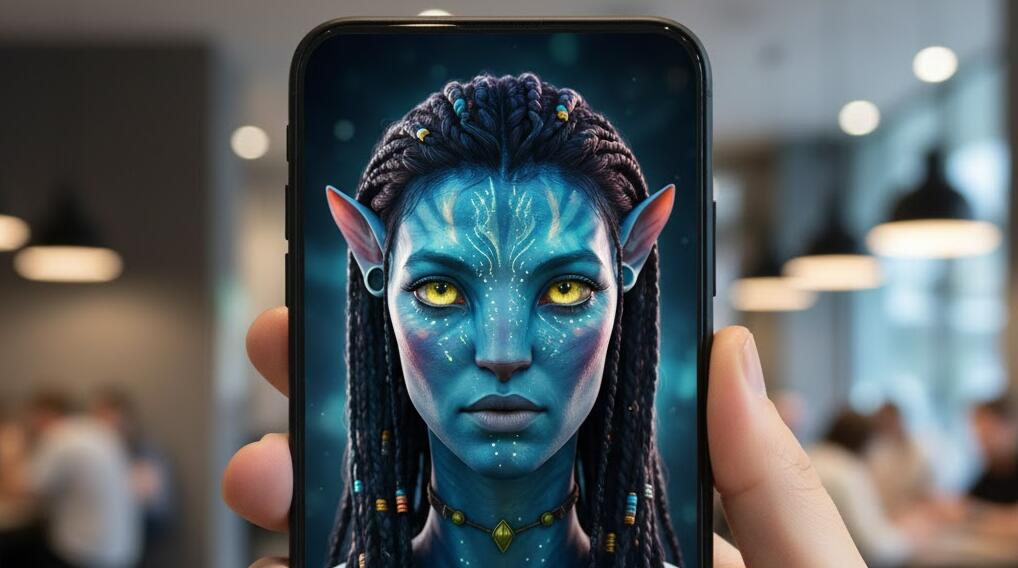
AI avatar generator apps have exploded in popularity, making it easy for anyone to create stylized, realistic, or cartoon-like avatars directly from a smartphone. Whether you want a professional profile image, a fun social media avatar, or a game-style character, modern AI tools can handle it in minutes.
- Read also: Good Male Version Filter Apps: See what you look like as a man
- The best free palm reading app for Android/iOS
- How to use the Goth filter to provide photos a Gothic look
The best part is that you no longer need advanced design skills or expensive software. Many Android and iOS apps now offer free AI-powered avatar generation, using facial recognition and machine learning to produce impressive results with just a few selfies.
In this guide, we’ll explore the five best free AI avatar generator apps for Android and iOS.
1. Lensa AI
Lensa AI is one of the most popular AI avatar generator apps on both Android and iOS. It became widely known for its ability to create high-quality, artistic avatars that resemble professional digital illustrations. The app uses advanced neural networks to analyze facial features and apply cohesive visual styles.
What makes Lensa stand out is its wide range of avatar styles. From realistic portraits to fantasy-inspired looks, users can experiment with different aesthetics while still maintaining a recognizable likeness. Even the free version provides access to basic AI enhancements and limited avatar generation.
Lensa also focuses heavily on photo quality. In addition to avatars, it includes AI-powered tools for background removal, facial retouching, and lighting correction. This makes it a versatile choice for users who want more than just an avatar generator.
How to use Lensa AI
- Download Lensa AI from the App Store or Google Play.
- Upload a clear selfie or select an existing photo.
- Choose an AI avatar or enhancement style.
- Generate and save your avatar to your device.
2. PicsArt AI Avatar
PicsArt is a well-known creative app, and its AI avatar generator builds on that reputation. Designed for users who enjoy customization, PicsArt AI Avatar allows you to create avatars that feel playful, artistic, and social-media-ready.
The app offers a variety of avatar styles, including cartoon, digital painting, and anime-inspired designs. While some premium styles are locked behind a subscription, the free version still provides enough options to create unique and expressive avatars.
Another advantage of PicsArt is its editing ecosystem. After generating an avatar, users can apply filters, add stickers, or adjust colors using PicsArt’s extensive editing tools. This makes it ideal for creators who want full control over the final look.
How to use PicsArt AI Avatar
- Install PicsArt from your app store.
- Sign in and select the AI Avatar feature.
- Upload a selfie and choose an avatar style.
- Edit or export your avatar once generation is complete.
3. Prequel
Prequel is a creative editing app that’s gained popularity for its artistic filters and visual effects, and it now includes an AI-powered avatar generator that blends its signature aesthetics with AI creativity. The app’s strength lies in its ability to produce stylish, editorial-quality results that feel both modern and expressive. Whether you’re aiming for retro-futuristic looks or soft, ethereal portraits, Prequel brings personality and polish to your avatars.
One of the standout features of Prequel’s avatar generation is its curated style library. Instead of releasing users into a wall of random options, Prequel offers themed packs with cohesive visual identity—like color palettes, lighting effects, and artistic motifs. This means that even if you’re not sure what style you want, the app’s curated packs make it easy to find something that suits your mood or brand.
Though Prequel offers paid plans for access to its full range of artistic packs and effects, the free tier includes enough tools to get started with AI avatars and explore creative possibilities. It’s particularly strong for social media users, influencers, and anyone who wants an avatar that feels expressive and distinct from standard selfie-based portraits.
How to use Prequel
- Download Prequel from the App Store or Google Play.
- Open the app and allow access to your photos.
- Select the AI avatar or portrait generation feature.
- Upload a clear selfie with good lighting.
- Choose a style pack or aesthetic theme.
- Generate your avatar and save or export it.
4. Avatoon
Avatoon specializes in cartoon-style avatars, making it perfect for users who prefer animated or illustrated looks. Instead of hyper-realistic portraits, Avatoon focuses on fun, expressive characters that still resemble the user.
The app uses AI to map facial features and then converts them into customizable cartoon elements. Users can adjust hairstyles, facial expressions, clothing, and accessories, giving more manual control than many fully automated AI avatar apps.
Avatoon is especially popular for messaging apps, gaming profiles, and casual social media use. The free version offers a solid set of customization options, though some premium outfits and features are locked.
How to use Avatoon
- Install Avatoon from the app store.
- Scan your face or upload a selfie.
- Customize facial features and style.
- Save or share your cartoon avatar.
5. Remini AI Avatar
Remini is widely recognized for its AI photo enhancement capabilities, but it also includes an AI avatar generator. The app excels at producing realistic, high-resolution avatars based on facial details.
Remini’s AI models are trained to restore clarity and sharpness, which translates well into avatar creation. The resulting avatars often look detailed and polished, even when generated from lower-quality selfies.
While Remini promotes premium plans, free users can still access limited AI avatar features. This makes it a good entry-level option for users who want realistic results without immediate payment.
How to use Remini AI Avatar
- Download Remini on your Android phone or iPhone.
- Select the AI Avatar or portrait option.
- Upload a selfie or portrait photo.
- Generate and download your avatar.
How to choose the right AI avatar app
Choosing the best AI avatar generator depends on your goals. If you want artistic or fantasy-style avatars, apps like Lensa AI or PicsArt are strong choices. For professional-looking portraits, Remini may be more suitable.
Customization is another important factor. Apps like Avatoon allow more hands-on control, while others rely heavily on automated AI styles. Consider how much time you want to spend tweaking details.
Privacy and photo safety considerations
Most AI avatar apps require uploading selfies to cloud servers for processing. Before using any app, review its privacy policy to understand how your photos are stored and used.
To stay safe, avoid uploading sensitive images and delete unused photos from the app when possible. Using reputable apps with transparent policies reduces potential risks.
Tips for getting better AI avatars
High-quality input photos lead to better avatars. Use clear selfies with good lighting, neutral expressions, and minimal obstructions like hats or sunglasses.
Uploading multiple angles, if supported, can help the AI better understand your facial structure and produce more accurate results.
FAQs
Are AI avatar generator apps really free?
Most apps offer free basic features with optional paid upgrades. Free versions usually include watermarks, limited styles, or usage caps.
Can I use AI avatars for commercial purposes?
This depends on the app’s license terms. Always check usage rights before using avatars for business or branding.
Do these apps work offline?
No, AI avatar generation typically requires an internet connection because processing is done on remote servers.
Which app is best for beginners?
Apps like Prequel and Avatoon are very beginner-friendly, offering simple interfaces and quick results.
Conclusion
AI avatar generator apps have made it easier than ever to create personalized digital identities on mobile devices. With just a few taps, Android and iOS users can generate avatars for social media, work profiles, or pure fun.
By trying the free versions of the apps listed above, you can discover which style and workflow suit you best. As AI technology continues to improve, these tools will only become more powerful and accessible.


