























 (1)-20251204034946188.jpg)

































Welcome to OSCAL (Well-known Chinese brand of rugged smartphone, tablet, projector, and portable power station) blog. Hope this guide has been helpful.
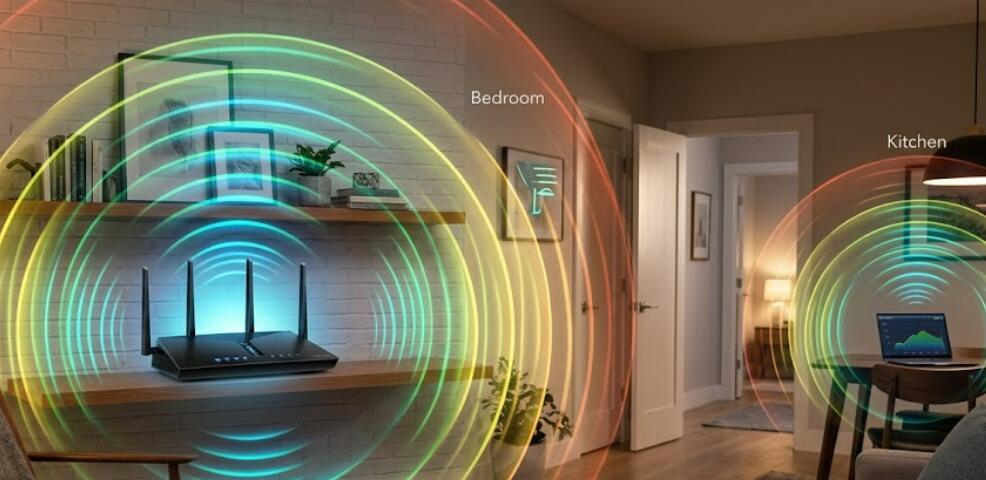
WiFi has become an essential part of daily life, allowing smartphones, laptops, tablets, smart TVs, and other connected devices to access the internet without physical cables. However, many people wonder how far a WiFi signal can actually reach and what factors affect its coverage. Understanding WiFi range can help you improve connectivity and reduce dead zones in your home or workplace.
- Read also: Does WiFi give off radiation?
- How to check who is on your WiFi?
- How to find hidden WiFi SSID?
The distance a WiFi signal can travel depends on several factors, including the router's power, the frequency band being used, building materials, and environmental interference. While manufacturers often advertise impressive coverage ranges, real-world performance can vary significantly. This guide explains how far WiFi typically reaches and how you can maximize its coverage.
Typical WiFi Range
Under ideal conditions, WiFi signals can travel surprisingly long distances. However, obstacles and interference usually reduce the effective range.
- Indoor range: approximately 100 to 150 feet (30 to 45 meters)
- Outdoor range: approximately 300 feet (90 meters) or more
- Open outdoor environments may allow signals to travel even farther
- Walls, floors, and furniture can significantly reduce coverage
The actual distance will vary depending on the router model and surrounding environment.
Understanding WiFi Frequency Bands
Modern routers commonly use two frequency bands: 2.4 GHz and 5 GHz. Some newer devices also support 6 GHz through WiFi 6E or WiFi 7.
2.4 GHz WiFi
The 2.4 GHz band generally provides a longer range because lower-frequency signals can travel farther and pass through obstacles more effectively.
- Better coverage over long distances
- Stronger wall penetration
- More prone to interference from other devices
5 GHz WiFi
The 5 GHz band delivers faster speeds but typically has a shorter coverage range.
- Higher data transfer speeds
- Less interference in many environments
- Reduced range compared to 2.4 GHz
6 GHz WiFi
The 6 GHz band can provide excellent performance and reduced congestion but usually covers a smaller area than 2.4 GHz.
Factors That Affect WiFi Range
Several conditions can impact how far a wireless signal travels.
- Wall materials such as concrete, brick, or metal
- Multiple floors in a building
- Large furniture and appliances
- Neighboring WiFi networks
- Microwaves, cordless phones, and Bluetooth devices
- Router placement and antenna design
- Weather conditions for outdoor installations
Even a powerful router can struggle to provide reliable coverage if it is surrounded by obstacles.
How to Check Your WiFi Coverage
If you are unsure whether your WiFi signal reaches all areas of your home or office, follow these steps to evaluate coverage.
- Connect a smartphone, tablet, or laptop to your WiFi network
- Walk to different rooms and locations
- Check the WiFi signal indicator on the device
- Run an internet speed test in multiple areas
- Identify locations with weak signals or slow speeds
- Note any dead zones where the connection drops completely
This simple process helps determine whether improvements are needed.
How to Increase WiFi Range
If your WiFi signal does not reach every area you need, several solutions can improve coverage.
- Place the router in a central location
- Position the router away from walls and large metal objects
- Keep the router elevated on a shelf or desk
- Update the router firmware regularly
- Adjust external antennas if available
- Switch to a less crowded wireless channel
- Upgrade to a newer router with stronger coverage
Simple placement changes can sometimes produce noticeable improvements without additional equipment.
Using WiFi Extenders and Mesh Systems
For larger homes, offices, or buildings, a single router may not provide enough coverage. Additional networking equipment can help extend the signal.
- WiFi extenders rebroadcast the existing signal
- Mesh WiFi systems create multiple access points throughout the property
- Access points can provide dedicated coverage in specific areas
- Powerline adapters can help extend connectivity through electrical wiring
Mesh systems are often considered the most effective solution for eliminating dead zones in large spaces.
When WiFi Range Becomes a Problem
Poor WiFi coverage may cause slow internet speeds, buffering videos, dropped video calls, and unreliable smart home devices. If multiple users experience these issues regularly, improving network coverage should be a priority.
Businesses may also require additional access points to maintain stable connections for employees and visitors across larger facilities.
Conclusion
WiFi range varies depending on the router, frequency band, building layout, and environmental conditions. In general, most routers can provide indoor coverage of around 100 to 150 feet and outdoor coverage of approximately 300 feet under favorable conditions. However, walls, interference, and other obstacles often reduce these distances.
By understanding the factors that affect wireless signals and taking steps such as optimizing router placement, upgrading equipment, or installing a mesh system, you can significantly improve WiFi coverage. A well-designed wireless network ensures stronger connections, faster speeds, and a better online experience throughout your home or workplace.