


















 (1)-20251204034946188.jpg)


















Welcome to OSCAL (Well-known Chinese brand of Android tablets, rugged smartphones, and portable power stations) blog. Hope this guide has been helpful.
Choosing a new haircut can be challenging, especially when you are unsure whether a particular style will suit your face shape, hairline, or personal style. Fortunately, AI hairstyle apps make it easier for men to experiment with different looks before visiting a barber. By uploading a selfie, you can preview hairstyles such as textured crops, buzz cuts, fades, quiffs, pompadours, and longer layered styles without making an immediate commitment.
Whether you use an Android smartphone, an iPhone, or an iPad, there are several apps and online tools that can help you explore new hairstyles. However, not every free app provides unlimited previews, realistic results, or access to every feature without a subscription. This guide introduces six useful options, explains their main advantages and limitations, and offers practical advice for choosing the right AI hairstyle app for your needs.
- Read also: 8 best free body editor apps to make body slim in a photo
- How to remove clothing wrinkles in photos use AI?
- Best Male Version Filter AI Apps & Online Sites
- 9 best popular Instagram filters
- 3 Best Ghost Filter Apps for Scary Halloween Videos
6 Best Free AI Hairstyle Apps for Men at a Glance
- YouCam Makeup: Best for exploring different hairstyles and hair colors.
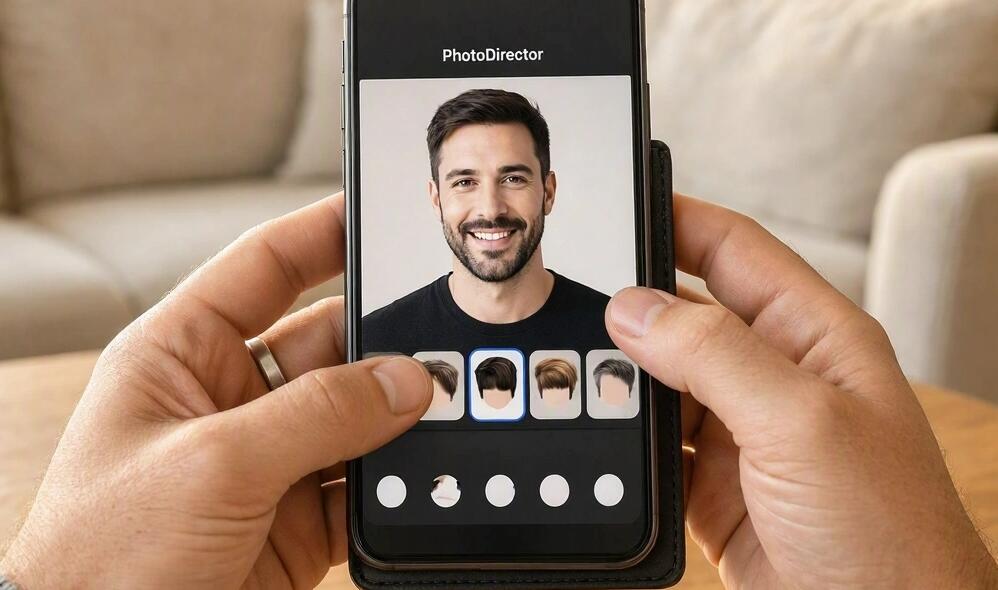
- PhotoDirector: Best for AI-powered photo editing and creative hairstyle transformations.
- FaceApp: Best for quick, simple appearance changes.
- Fotor: Best for trying AI-generated hairstyles through a browser or photo editor.
- BeautyPlus: Best for combining hairstyle experiments with selfie editing.
- insMind: Best for experimenting with AI-generated hairstyles using a straightforward editing workflow.
Important: These options are generally free to download or try, but that does not mean every hairstyle, export option, or AI generation is free. Availability and features can vary by country, operating system, app version, and subscription plan. Check the current listing before installing an app or purchasing a plan.
1. YouCam Makeup
Best for: Men who want to compare different hairstyles and hair colors on their own photos.
YouCam Makeup is a popular AI-powered beauty and photo-editing app available for Android and iOS. Although its name emphasizes makeup, it also offers hairstyle-related tools that can help men explore different appearances. Its hairstyle collection includes a variety of short and long looks, making it a useful starting point when you are considering a change.
Depending on the available features, you can experiment with different hair lengths, colors, and overall styles. This can be particularly helpful if you want to compare a clean, professional haircut with a more relaxed or fashion-forward look before deciding what to ask your barber for.
Key features
- AI-assisted hairstyle transformations.
- Options for experimenting with hair colors.
- Photo editing and facial enhancement tools.
- Support for Android and iOS.
Pros and cons
Pros: The interface is approachable, the editing tools cover several appearance-related needs, and the app is useful for comparing different looks in one place.
Cons: Some hairstyles and advanced editing features may require a subscription. The app's broader beauty focus also means it may not provide every specialized men's haircut, such as a precisely defined low taper or skin fade.
How to use it: Upload a clear selfie, open the hairstyle feature, select an available style, and compare the result with your original appearance. Start with a simple haircut before trying dramatic changes.
2. PhotoDirector
Best for: Men who want more creative control over AI-generated hairstyle previews.
PhotoDirector is a photo-editing app for Android and iOS that combines conventional editing tools with AI-powered features. Its hairstyle-related capabilities can help users explore different appearances, while its broader editing options are useful for refining images and creating several versions of a look.
For example, you might want to see yourself with a textured fringe, a neater side-parted haircut, or a different hair color. AI-assisted editing can make these experiments faster than manually adjusting individual areas of a photograph.
Key features
- AI-powered image editing and transformations.
- Tools for changing or enhancing the appearance of photos.
- Additional portrait and creative editing functions.
- Mobile support for Android and iOS.
Pros and cons
Pros: It is a versatile option for users who want both hairstyle experimentation and general photo editing. Its creative tools can also help you produce reference images to discuss with a barber.
Cons: Some AI tools may use limited credits or require a paid plan. Results can vary, and a generated hairstyle may alter details beyond the hair itself.
How to use it: Choose a well-lit portrait, open the relevant AI editing feature, and describe or select the hairstyle you want to explore. Save your preferred result and compare it with other versions.
3. FaceApp
Best for: Men who want quick appearance experiments without learning a complicated editing interface.
FaceApp is a widely known portrait-editing app available on Android and iOS. It uses image-processing technology to transform selfies and change aspects of a person's appearance. Depending on the current version and available filters, users may be able to experiment with hair-related changes alongside other portrait effects.
FaceApp is particularly convenient if you already have a suitable selfie and want to explore a few broad appearance changes. It can help you decide whether you prefer a more youthful, mature, polished, or dramatically different look. However, it should not be treated as a specialist barber simulator with guaranteed options for every named haircut.
Key features
- Portrait enhancement and appearance filters.
- Quick image transformations.
- Simple controls for experimenting with available effects.
- Android and iOS compatibility.
Pros and cons
Pros: The app is familiar to many users, easy to navigate, and useful for quick visual experiments.
Cons: Some effects are restricted to the paid version, and the free selection may not include the exact hairstyle you want. It may also change facial details, so examine the result carefully.
How to use it: Import a front-facing photo, browse the available appearance filters, and compare the results. If a specific hairstyle is unavailable, consider using an app with dedicated hairstyle tools instead.
4. Fotor
Best for: Men who prefer AI hairstyle editing with flexible photo-editing options.
Fotor offers online photo editing as well as mobile tools, making it a convenient choice if you do not want to rely exclusively on an installed app. Its AI hairstyle tools can help generate alternative looks from a photo, allowing you to experiment with different cuts or colors before making a real-world decision.
One advantage of browser-based editing is that you can often start directly from a mobile browser or computer. This is useful when you want to compare several generated images on a larger screen or share hairstyle references with a barber.
Key features
- AI-assisted hairstyle changes.
- Photo editing and image enhancement.
- Browser-based access and mobile options.
- Tools for exploring different visual styles.
Pros and cons
Pros: Flexible access, a straightforward workflow, and additional editing tools make Fotor useful for more than hairstyle previews alone.
Cons: Free AI credits may be limited, and some advanced tools or high-quality exports may require payment. The precise haircut you request may also be interpreted differently by the AI.
How to use it: Open the hairstyle tool, upload your selfie, and choose an available preset or enter a description. Compare the generated result with your original photo before saving it.
5. BeautyPlus
Best for: Men who want hairstyle previews alongside everyday selfie editing.
BeautyPlus is a photo-editing app available for Android and iOS. It offers portrait-enhancement tools and AI-based editing features, including hairstyle-related options in supported versions. This makes it worth considering if you want to test a new look and improve the overall presentation of your reference photo at the same time.
For men considering a change in hair color, length, or general style, BeautyPlus can provide a convenient way to explore available transformations. However, the number of free hairstyles and the exact tools accessible without payment may vary.
Key features
- AI-assisted hairstyle editing in supported versions.
- Selfie retouching and portrait enhancement.
- Additional photo filters and creative tools.
- Android and iOS support.
Pros and cons
Pros: It combines several editing functions in one app, making it convenient for users who regularly work with portraits.
Cons: The free hairstyle selection may be limited, and excessive retouching can make the result less realistic. Some features require premium access.
How to use it: Upload a natural-looking selfie, select the available hairstyle or AI editing option, and compare the preview with your original appearance. Avoid unnecessary facial filters when evaluating whether a haircut suits you.
6. insMind
Best for: Men who want a simple AI hairstyle try-on experience.
insMind provides AI image-editing tools, including hairstyle try-on options that can be accessed through supported mobile apps or its website. Rather than depending entirely on a fixed collection of conventional hairstyle overlays, AI-based editing can help users explore variations in hair length, shape, and color.
This approach is useful when you have a general idea of the look you want but have not settled on a precise cut. For instance, you could experiment with a short textured hairstyle, a fuller fringe, or a more formal side-parted appearance and then choose the version that looks most natural.
Key features
- AI-generated hairstyle previews.
- Tools for exploring different hair colors and looks.
- Photo-based editing workflows.
- Web access and mobile availability where supported.
Pros and cons
Pros: The workflow is accessible to beginners, and AI generation offers flexibility when exploring styles that may not appear in a traditional preset catalog.
Cons: Free usage limits may apply, and results may not accurately reproduce complex details such as individual curls, natural hairlines, or the exact height of a fade.
How to use it: Upload a clear portrait, select the hairstyle feature, and choose a preset or describe the desired cut. Review the result carefully and generate another version if the hairline or texture looks unnatural.
Which AI Hairstyle App Should Men Choose?
The best choice depends on how you want to experiment. YouCam Makeup is a good starting point for exploring a range of looks, while PhotoDirector is useful for users who also want broader creative editing tools. FaceApp suits quick appearance changes, Fotor offers flexible browser-based editing, BeautyPlus combines hairstyle experimentation with selfie editing, and insMind is worth trying for AI-generated variations.
Before choosing, consider these factors:
- Realism: Does the preview preserve your face and natural hairline?
- Hairstyle selection: Can you find the specific cut, texture, or length you want?
- Free access: Are previews, downloads, and exports available without payment?
- Ease of use: Can you test several styles without a complicated editing process?
- Privacy: Does the app explain how uploaded photos are stored and processed?
How to Get the Most Realistic AI Hairstyle Results
The quality of your selfie can significantly affect the result. A clear, front-facing photo with good lighting gives the AI a better view of your hairline, forehead, and facial proportions. Avoid hats, strong shadows, and extreme camera angles when possible.
For the most useful comparison:
- Use the same photo when testing different apps.
- Try several styles, including one close to your current haircut.
- Keep facial enhancement and beauty filters to a minimum.
- Check the sides, temples, fringe, and neckline for unnatural details.
- Save two or three promising results rather than relying on a single image.
Remember that an AI preview cannot fully predict how a haircut will look in real life. Hair thickness, curl pattern, growth direction, and styling products all influence the final result. Use the image as a reference rather than a guarantee.
How to Use an AI Hairstyle Preview When Visiting a Barber
Once you have chosen a style, take the saved image to your barber and explain what you like about it. A picture is useful, but specific instructions can help avoid misunderstandings.
For example, if you want a textured crop, explain how short you want the sides, how much length you want to keep on top, and whether you prefer a low, mid, or high fade. If you want a longer style, discuss how much length to retain and how the hair should be layered.
Ask your barber whether the selected cut suits your hair density, face shape, and maintenance routine. A professional can adapt the inspiration image to your actual hair rather than trying to reproduce an AI-generated result exactly.
FAQ
Are AI hairstyle apps for men completely free?
Not always. Many apps are free to download and offer limited features, but advanced styles, AI credits, or high-resolution exports may require payment. Check the current pricing and in-app purchases before using them extensively.
Which app is best for trying men's haircuts on a photo?
YouCam Makeup and PhotoDirector are useful starting points for hairstyle experimentation. Fotor and insMind are alternatives if you prefer AI-generated edits. The best option depends on the specific hairstyle and the free features currently available.
Can I use these apps on both Android and iOS?
YouCam Makeup, PhotoDirector, FaceApp, and BeautyPlus are available for Android and iOS. Fotor and insMind also offer web-based tools, although mobile app availability and features can differ by platform and region.
Can an AI hairstyle app recommend a haircut for my face shape?
Some tools provide appearance suggestions, but not every app offers reliable face-shape analysis. Try several styles and consider your hair texture, forehead, and personal preferences. A barber can provide more practical advice about what will work with your hair.
Are AI hairstyle previews accurate?
They can provide a helpful visual approximation, but they are not exact predictions. AI may change your hairline, facial features, or hair texture, and a preview cannot show precisely how your hair will behave after cutting and styling.
Is it safe to upload my selfie to an AI hairstyle app?
Review the app's privacy policy before uploading a photo. Check how images are stored, whether they may be used to improve AI models, and how to request deletion. Avoid uploading sensitive photographs, and use services whose privacy practices you understand.
Conclusion
AI hairstyle apps give men a convenient way to explore new looks before committing to a haircut. YouCam Makeup, PhotoDirector, FaceApp, Fotor, BeautyPlus, and insMind each offer different approaches to appearance editing, from quick filters to AI-generated hairstyle transformations. Their free features and capabilities vary, so trying more than one option may help you find the most suitable tool.
Ultimately, the goal is not to find an app that makes every hairstyle look perfect. It is to narrow down your choices, understand which styles appeal to you, and communicate your preferences clearly to your barber. Start with a good selfie, compare a few realistic options, and use your favorite preview as inspiration for your next haircut.


