




















 (1)-20251204034946188.jpg)














Welcome to OSCAL (Well-known Chinese brand of rugged outdoor smartphone, Android tablet, projector, and portable power station) blog. Hope this guide has been helpful.
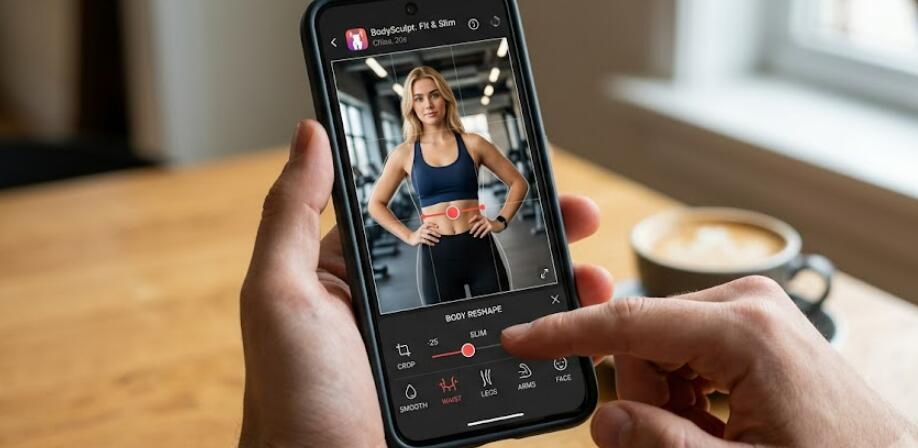
Body photo editing has become increasingly popular as smartphone cameras continue to improve and social media platforms encourage users to share polished images. Whether you want to make your waist appear slimmer, lengthen your legs, refine your arms, or create a more balanced body shape, modern body editing apps provide easy-to-use tools that can produce natural-looking results with just a few taps. The key is to use these features carefully so your photos still look realistic rather than overly edited.
- Read more: The 5 best free AI avatar generator apps
- The 5 best Android apps for merging two faces into one
- How to remove wrinkles from clothes in a photo for free?
- Best apps for removing wrinkles from clothes in photos
- Male Version Filter AI Apps: See what you look like as a man
Both Android and iOS users have access to a wide range of body editing apps, but not every app offers the same quality, ease of use, or editing accuracy. Some focus on AI-powered body reshaping, while others provide professional manual adjustment tools for greater control. In this guide, we'll introduce five excellent Android apps and three recommended iOS apps that can help make your body appear slimmer in photos. Before reviewing each app in detail, here's a quick overview of the recommended options.
Best Body Slimming Apps for Android
- Body Editor
- Perfect Me
- BeautyPlus
- YouCam Perfect
- AirBrush
1. Body Editor
Body Editor is one of the most popular body reshaping apps available for Android users. It is specifically designed for body enhancement and includes dedicated tools for slimming the waist, reducing body width, extending legs, enlarging muscles, and improving overall body proportions. The interface is beginner-friendly, making it suitable even for users with no photo editing experience.
One of its biggest strengths is the adjustable intensity slider, allowing users to make subtle improvements instead of dramatic transformations. This helps maintain a natural appearance while enhancing body shape. In addition to body editing, the app also offers face retouching, filters, background editing, and photo enhancement features.
2. Perfect Me
Perfect Me combines beauty editing and body reshaping in a single application. It includes AI-assisted tools that automatically detect body outlines, making slimming adjustments faster and easier. Users can reduce waist size, reshape hips, slim arms, lengthen legs, and improve posture with only a few taps.
Beyond body editing, Perfect Me provides skin smoothing, acne removal, makeup tools, teeth whitening, and facial retouching. This makes it an excellent all-in-one editor for creating polished social media photos.
3. BeautyPlus
BeautyPlus is well known as a selfie editing application, but its body editing capabilities have improved significantly in recent years. The Body Reshape feature allows users to slim the waist, reshape legs, reduce shoulder width, and adjust overall body proportions without affecting the surrounding background too much.
The app also includes AI portrait enhancement, lighting correction, artistic filters, object removal, and background replacement. Users looking for an easy editing experience with many additional creative tools will appreciate BeautyPlus.
4. YouCam Perfect
YouCam Perfect uses AI technology to simplify body editing while preserving realistic image quality. The Body Tuner tool enables users to slim the waist, reshape arms, adjust leg length, and refine body contours with smooth transitions that avoid obvious distortions.
Another advantage is its automatic portrait detection, which helps minimize editing mistakes around clothing and backgrounds. Besides body shaping, the app offers object removal, animated effects, collages, sky replacement, and high-quality portrait enhancement.
5. AirBrush
AirBrush has become one of the most trusted mobile photo editors because of its balance between simplicity and professional-quality editing. Its body editing tools allow users to make subtle slimming adjustments while maintaining realistic proportions.
Users can reshape the waist, improve posture, refine body curves, and edit facial features without requiring advanced editing skills. AirBrush also provides skin retouching, blemish removal, lighting adjustments, and portrait enhancement, making it suitable for everyday photo editing.
Best Body Slimming Apps for iOS
- Peachy
- RetouchMe
- Everlook
1. Peachy
Peachy is an iOS-exclusive body editing application designed specifically for portrait enhancement. It offers intuitive body reshaping tools that let users slim the waist, adjust hips, lengthen legs, and create smoother body lines. The editing controls are highly responsive, allowing users to make precise adjustments without over-editing the image.
In addition to body reshaping, Peachy includes facial retouching, wrinkle removal, skin smoothing, eye enhancement, and makeup tools. Its clean interface makes the editing process fast and enjoyable.
2. RetouchMe
RetouchMe offers a different editing experience compared to traditional body editor apps. Instead of relying entirely on automatic AI tools, many edits are refined using professional editing technology, producing highly natural-looking results.
Users can request waist slimming, body reshaping, leg lengthening, posture correction, and muscle enhancement. The app also supports face editing, clothing adjustments, background cleanup, and object removal, making it suitable for users seeking high-quality portrait edits.
3. Everlook
Everlook focuses on fashion-style portrait editing with advanced body contouring tools. It allows users to slim body shape, lengthen legs, improve posture, and enhance body curves while preserving realistic proportions.
The app also includes beauty filters, skin enhancement, facial reshaping, hair editing, and lighting adjustments. Everlook is especially popular among users who frequently edit lifestyle, travel, and fashion photos before sharing them online.
How to Choose the Right Body Slimming App
The ideal app depends on your editing style and expectations. If you prefer quick automatic edits, AI-powered apps such as YouCam Perfect and BeautyPlus are excellent choices. If you want more manual control over body proportions, Body Editor and Peachy provide detailed adjustment tools.
- Choose apps with adjustable editing intensity.
- Look for realistic body reshaping instead of extreme transformations.
- Consider apps that include additional portrait editing features.
- Check whether watermark-free exports are available.
- Review subscription pricing before purchasing premium features.
Tips for Creating Natural-Looking Slimming Effects
Even the best editing apps can produce unrealistic results if used excessively. Subtle adjustments generally create the most believable images and help maintain natural body proportions.
- Use small editing adjustments instead of maximum settings.
- Avoid bending straight background lines.
- Keep body proportions balanced.
- Zoom in while editing for greater precision.
- Compare the edited photo with the original before saving.
- Preserve natural lighting and shadows.
- Edit only the areas that need improvement.
FAQs
Can these apps make my body look slimmer automatically?
Many of the recommended apps include AI-powered body detection that automatically identifies body contours and applies slimming effects, although manual adjustments usually provide more accurate results.
Will body editing reduce photo quality?
Most modern apps preserve high image quality, especially when exporting at full resolution. However, excessive editing may create visible distortions.
Are these apps free?
Most offer free versions with basic body editing tools, while advanced features are available through premium subscriptions or one-time purchases.
Can beginners use these apps?
Yes. All of the apps listed above feature user-friendly interfaces designed for both beginners and experienced photo editors.
Alternative Body Slimming Apps Worth Trying
If none of the apps above fully meets your needs, you may also consider other popular photo editing applications that occasionally include body reshaping features through updates. Since mobile editing software evolves rapidly, new AI-powered tools continue to appear each year. Comparing features, export quality, and subscription costs can help you find the best solution for your editing style.
Final Thoughts
Whether you're using an Android smartphone or an iPhone, there are plenty of excellent body photo editor apps available to help create slimmer, more flattering portraits. Apps like Body Editor, Perfect Me, BeautyPlus, YouCam Perfect, and AirBrush provide Android users with reliable editing tools, while Peachy, RetouchMe, and Everlook deliver impressive body reshaping capabilities for iOS users.
The most attractive edited photos are usually those with subtle, natural-looking improvements rather than dramatic alterations. By selecting the right app and making careful adjustments, you can enhance your body shape while preserving realism and creating photos that look polished, confident, and authentic.


