
















 (1)-20251204034946188.jpg)













Welcome to OSCAL (Well-known Chinese brand of rugged outdoor smartphones, tablets, projectors, and portable power stations) blog. Hope this guide has been helpful.
Christmas is the perfect time to experiment with festive makeup, creative face filters, and magical video effects. Whether you want to create a glamorous Christmas Eve look, add sparkling eyeshadow and red lipstick, or transform an ordinary selfie video into a winter wonderland, AI-powered beauty apps make the process easier than ever. With features such as virtual makeup, face tracking, animated snowflakes, glowing effects, and festive stickers, you can create eye-catching Christmas videos without professional makeup skills or expensive editing software.
- Read also: The 6 free Face swap apps for video
- The 6 best free AI hairstyle apps for men
- The 8 best free body photo editor apps
- 5 Best free Android apps with 'AI Auto Clip' feature
- The 5 free Android apps for merging two faces into one
However, not every beauty app offers the same Christmas effects, and some advanced features require a paid subscription. Choosing an app with useful free tools is essential if you want to create atmospheric holiday content without spending money. Below are five popular apps worth trying, followed by a detailed tutorial explaining how to combine Christmas makeup filters, video clips, music, and decorations into a beautiful festive video.
5 best free AI apps with Christmas makeup filters
Here is a quick list of the five apps covered in this guide:
- Snapchat: Best for real-time Christmas makeup lenses and animated facial effects.
- CapCut: Best for Christmas video templates, transitions, and festive editing.
- BeautyPlus: Best for glamorous virtual makeup and beauty enhancement.
- Meitu: Best for AI beauty effects and creative Christmas-themed edits.
- B612: Best for playful AR makeup filters and cute holiday camera effects.
Snapchat: Best for real-time Christmas makeup filters
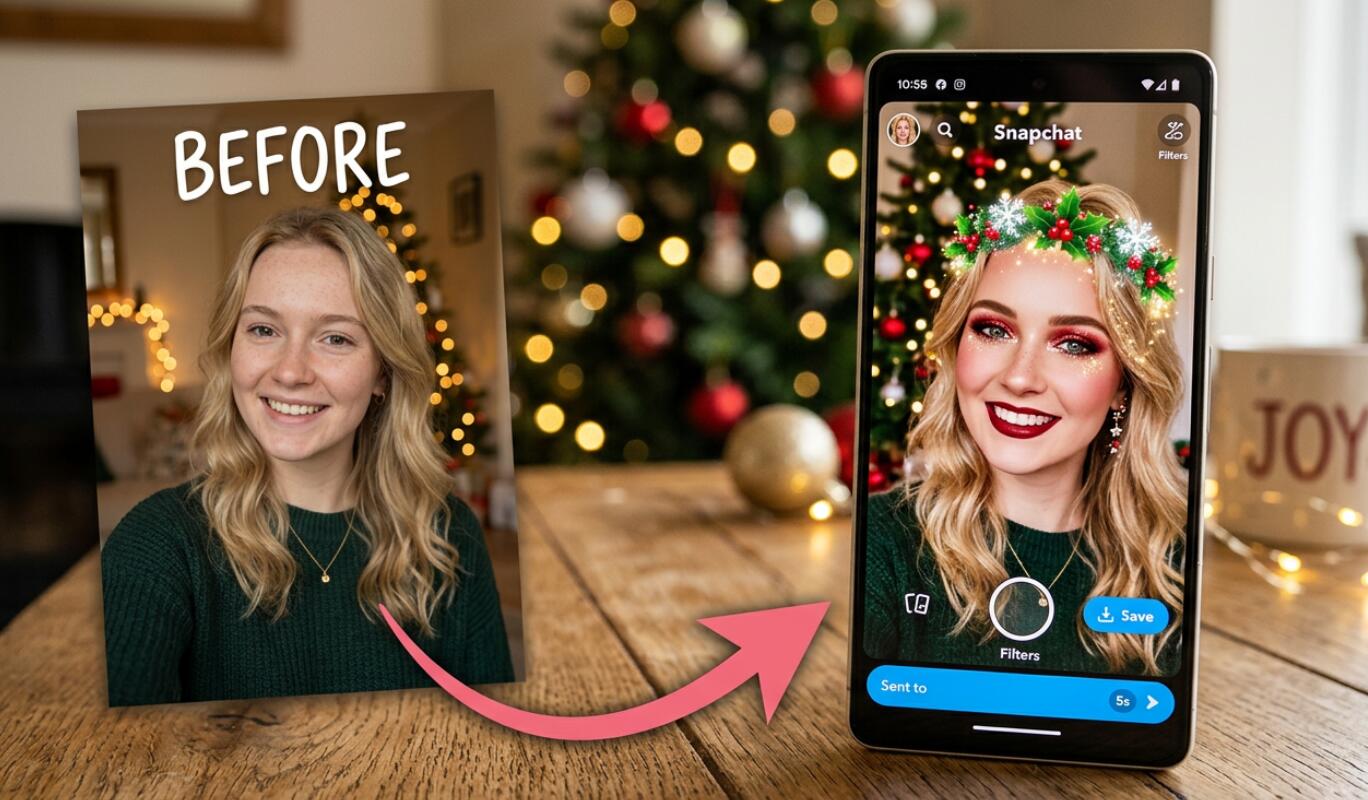
Snapchat is an excellent starting point if you want to experiment with Christmas makeup filters while recording yourself. Its augmented reality (AR) lenses can recognize facial features and apply effects in real time. Depending on the lens, you can add red lipstick, festive eye makeup, glitter, Christmas accessories, and animated winter decorations.
One appealing option is the Merry Xmas Lens, which combines Christmas elements such as reindeer ears, falling snowflakes, red eyeshadow, and red lipstick. The Christmas Sign Lens is another festive option featuring glowing lights, a winter atmosphere, and makeup-inspired effects.
Key features:
- Real-time facial tracking and AR makeup effects
- Christmas-themed lenses and animated decorations
- Built-in camera for recording short videos
- Easy sharing through social media
How to use it: Open Snapchat, enter the camera screen, and browse the available lenses. You can also explore Christmas lenses using Lens Explorer. Choose a suitable effect, position your face inside the camera frame, and record your video.
Snapchat is free to download and offers many free lenses, although availability can vary. It is particularly suitable for users who want a fun, interactive Christmas makeup transformation without complicated editing.
CapCut: Best for creating atmospheric Christmas videos
CapCut is a popular video editing app that helps turn simple Christmas makeup recordings into polished holiday videos. While it is not primarily a virtual makeup application, it offers a wide range of Christmas templates, filters, stickers, transitions, and visual effects. You can record your makeup look using another app and then import the footage into CapCut for final editing.
Its Christmas-themed templates make it easier to create videos featuring snowflakes, sparkling lights, Christmas trees, Santa hats, and warm holiday colors. You can also combine different clips to show your makeup transformation from a natural look to a glamorous festive appearance.
Key features:
- Christmas video templates and seasonal filters
- Animated stickers and visual effects
- Music, sound effects, and text overlays
- Transitions, trimming, and speed adjustments
- Video editing tools for social media content
How to use it: Open CapCut and browse its Christmas templates or start a new project. Import your makeup video, add festive stickers and effects, choose suitable background music, and adjust the transitions.
CapCut offers free editing tools, although certain templates, effects, and advanced features may require payment. It is a particularly good choice for users who want their Christmas makeup footage to look like a professionally edited holiday Reel or TikTok video.
BeautyPlus: Best for glamorous Christmas beauty looks
BeautyPlus is a useful choice if your main goal is to create a polished Christmas makeup appearance. The app combines AI-powered beauty tools, virtual makeup, creative filters, stickers, and special effects. You can experiment with different beauty styles before recording your festive video.
For a Christmas-inspired appearance, try combining red lipstick, rosy cheeks, glowing skin, and subtle eye enhancements. You can then add seasonal stickers, sparkling effects, and a festive background to create a more complete holiday look.
Key features:
- AI-powered beauty enhancement
- Virtual makeup and beauty editing tools
- Creative filters and seasonal stickers
- Background editing and special effects
- Photo and video editing capabilities
How to use it: Open BeautyPlus and select the camera or editing feature. Experiment with available makeup tools, adjust your preferred beauty effects, and capture or import a video. Add Christmas decorations and suitable filters to complete the look.
BeautyPlus is free to download, with additional premium filters and editing features available through paid plans. It is particularly suitable for creators who prefer elegant beauty effects rather than exaggerated cartoon-style Christmas transformations.
Meitu: Best for AI makeup and creative Christmas edits
Meitu is an AI-powered photo and video editing app that offers a variety of beauty enhancement tools. Its video retouching features include AI makeup, allowing users to enhance facial appearances and experiment with different looks. It also provides creative filters, artistic effects, and seasonal editing options.
For Christmas content, you can create a glamorous makeup look using red or berry-colored lipstick, shimmering eye makeup, and soft skin enhancement. Combine these adjustments with Christmas-themed stickers, warm lighting, and decorative backgrounds to create an atmospheric video.
Key features:
- AI makeup and facial enhancement
- Video retouching and editing
- Creative filters and artistic effects
- Christmas and New Year-themed editing content
- Animated stickers and decorative elements
How to use it: Open Meitu, select the video editing or beauty section, and import your footage. Explore the available AI makeup tools, adjust the intensity of your chosen effects, and add seasonal decorations. Preview the finished video before exporting it.
Meitu offers free access with in-app purchases. Some AI features, filters, and editing options may be restricted to premium users. It is a good option for people who want to combine beauty enhancement with creative visual storytelling.
B612: Best for playful AR makeup and Christmas camera effects
B612 is a camera and video editing app known for its real-time beauty filters, customizable AR makeup, and regularly updated effects. It is particularly useful when you want to record Christmas videos directly through your smartphone camera rather than applying every effect afterward.
You can experiment with different lipstick colors, eye makeup, face filters, and seasonal AR effects. For an atmospheric Christmas video, look for festive stickers, snow effects, glowing decorations, and cute holiday accessories. The available seasonal content may change depending on the time of year.
Key features:
- Real-time AR makeup and beauty filters
- Customizable facial effects
- Seasonal stickers and trendy filters
- Built-in video recording and editing
- Music, text, and decorative effects
How to use it: Launch B612 and open its camera. Browse the available beauty and AR makeup effects, select a suitable Christmas-inspired filter, and record your video. You can then use the built-in editing tools to add music, stickers, and text.
B612 is free to use, although some exclusive filters and advanced features require a VIP subscription. Its combination of real-time makeup and video recording makes it a convenient option for creating short, cheerful Christmas clips.
How to make an atmospheric Christmas video with makeup filters
After choosing your preferred app, the next step is to combine makeup effects, festive decorations, and video editing into one cohesive Christmas creation. You do not need expensive equipment. A smartphone, good lighting, and a few free editing tools are enough to get started.
Follow these detailed steps to create a beautiful Christmas makeup video:
- Step 1: Choose a Christmas makeup concept. Decide what kind of festive appearance you want. Popular ideas include glamorous red Christmas makeup, golden glitter eyeshadow, frosty winter makeup, and cute Santa-inspired looks. Having a clear concept makes it easier to choose suitable filters and decorations.
- Step 2: Prepare your recording environment. Find a clean, attractive location with good lighting. A decorated Christmas tree, warm fairy lights, candles, or a simple festive background can create a beautiful atmosphere. Position your phone at eye level and make sure your face is clearly visible.
- Step 3: Open your preferred makeup filter app. Launch Snapchat, BeautyPlus, Meitu, or B612. Browse the available beauty effects and seasonal filters. Look for red lipstick, glittery eyes, rosy cheeks, snowflakes, Christmas hats, or other holiday-inspired decorations.
- Step 4: Adjust the makeup intensity. Avoid selecting the strongest filter immediately. Experiment with different settings until the makeup looks balanced and natural. Make sure facial features remain recognizable and that the effects do not obscure your expressions.
- Step 5: Record several short clips. Capture different moments, such as applying the virtual makeup, revealing the finished look, smiling at the camera, or posing beside the Christmas tree. Record each clip for approximately three to five seconds to make the final video more dynamic.
- Step 6: Import your clips into CapCut. Open CapCut, create a new project, and select the recorded videos. Arrange them in a logical sequence, starting with a natural appearance and gradually revealing your completed Christmas makeup look.
- Step 7: Add Christmas visual effects. Browse the available effects, filters, and stickers. Add falling snow, sparkling particles, glowing lights, Christmas ornaments, or festive frames. Avoid using too many effects simultaneously, as they can make the video look cluttered.
- Step 8: Choose suitable Christmas music. Add a cheerful or gentle holiday soundtrack that matches the atmosphere. Soft instrumental music works well for elegant makeup transformations, while upbeat Christmas songs are suitable for playful videos. Check the music usage rights if you plan to publish commercial content.
- Step 9: Add text and transitions. Include short captions such as "Merry Christmas," "Christmas Glow," or "Holiday Magic." Use smooth transitions between clips and avoid excessive animation that distracts viewers from the makeup transformation.
- Step 10: Preview and export your video. Watch the entire video to check the makeup effects, lighting, audio, and transitions. Choose a suitable vertical aspect ratio, such as 9:16, for TikTok, Instagram Reels, and YouTube Shorts. Export using the highest quality available in your free plan.
Tips for choosing the right Christmas makeup filter
The right filter can make a significant difference to the final appearance of your video. Consider these tips when selecting your Christmas makeup effects:
- Choose complementary colors: Red, gold, silver, green, and champagne tones work particularly well for Christmas makeup.
- Prioritize natural-looking effects: Select filters that enhance your facial features without making your appearance look overly artificial.
- Match makeup with decorations: Coordinate your lipstick, eyeshadow, and accessories with the overall Christmas theme.
- Check facial tracking: Make sure the filter follows your face smoothly when you move or turn your head.
- Test multiple options: Compare several filters before recording your final video.
Creative Christmas video ideas to try
If you are unsure what kind of video to make, consider these popular Christmas content ideas:
- Christmas makeup transformation: Start with a natural face and gradually reveal a glamorous Christmas makeup look.
- Winter princess aesthetic: Combine icy blue eyeshadow, silver glitter, soft lighting, and falling snow effects.
- Santa-inspired beauty look: Use red lipstick, rosy cheeks, a Santa hat, and sparkling decorations.
- Christmas Eve get-ready video: Record your preparation process, from choosing makeup colors to showing the completed festive look.
These concepts work particularly well for short-form social media videos and can be adapted to different makeup styles and personal preferences.
Common mistakes to avoid when making Christmas videos
Even with excellent AI filters, a few editing mistakes can affect the final result. Keep the following points in mind:
- Do not combine too many beauty filters, as they may create an unnatural appearance.
- Avoid recording in extremely dark environments where facial tracking may become unstable.
- Do not use excessive transitions or flashing effects that distract from the makeup.
- Check the exported video for watermarks or reduced resolution before publishing.
- Review app permissions and privacy settings before uploading personal photos or videos.
FAQ
Which app is best for free Christmas makeup filters?
Snapchat is an excellent option for real-time Christmas makeup lenses, while B612 offers customizable AR makeup and seasonal camera effects. Both provide free features, although some additional content may require payment.
Can I create a Christmas makeup video without applying real makeup?
Yes. Apps such as Snapchat, BeautyPlus, Meitu, and B612 offer virtual makeup or beauty enhancement tools. You can experiment with lipstick, eyeshadow, blush, and other effects digitally before recording your video.
Which app is best for editing the finished Christmas video?
CapCut is a convenient choice because it provides video templates, transitions, music, stickers, and Christmas-themed visual effects. You can import footage recorded in another beauty app and complete the editing process in CapCut.
Are all Christmas makeup filters free?
No. The five apps in this guide offer free versions, but some filters, AI features, templates, and advanced editing tools may require subscriptions or in-app purchases. Check the pricing information before using premium content.
Can I post my Christmas makeup video on TikTok and Instagram?
Yes. You can export your finished video and share it on TikTok, Instagram Reels, YouTube Shorts, and other social platforms. A vertical 9:16 format is generally suitable for these platforms.
Final thoughts
Creating an atmospheric Christmas video does not have to be complicated or expensive. With the right AI makeup app, you can experiment with festive beauty looks, add sparkling decorations, and transform ordinary recordings into memorable holiday content. Snapchat, CapCut, BeautyPlus, Meitu, and B612 each offer different creative tools, making them useful choices for different video-making needs.
Ultimately, the best app depends on your preferred makeup style and editing requirements. Try the free features first, experiment with different Christmas effects, and combine your favorite clips into a cohesive video. With a little creativity and thoughtful editing, you can create a beautiful Christmas video that captures the warmth, sparkle, and magic of the holiday season.


