


















 (1)-20251204034946188.jpg)

















Welcome to OSCAL (Well-known Chinese brand of rugged outdoor smartphone, tablet, projector, and portable power station) blog. Hope this guide has been helpful.
Face swapping has become one of the easiest ways to create entertaining and eye-catching videos on a smartphone. With AI-powered technology, you can replace a face in a short clip, recreate a popular video trend, or transform yourself into a different character without needing advanced video-editing skills. Whether you use Android or iOS, there are now several apps that make video face swapping accessible to beginners.
- Read also: 6 free video body editing apps for Android/iOS
- 5 free palm reading scanner apps for Android/iOS
- 8 best free body photo editor apps (Android/iOS)
- Best apps to remove wrinkles from clothes in a photo
However, not every face swap app works in the same way. Some focus on ready-made video templates, while others allow you to upload your own footage and face images. Some are designed mainly for quick social media content, whereas others provide more customization options. Below are six free face swap apps for Android and iOS that are worth considering if you want to experiment with video face swapping.
6 Free Face Swap Apps You Should Try
- Reface – Best for quick and entertaining AI face swaps
- FaceMagic – Best for custom video and multiple-face swapping
- FacePlay – Best for template-based face swap videos
- PixNova AI – Best for flexible AI video face swapping
- Snapchat – Best for real-time face effects and social sharing
- Face Swap AI – Best for simple AI-powered face replacement
1. Reface
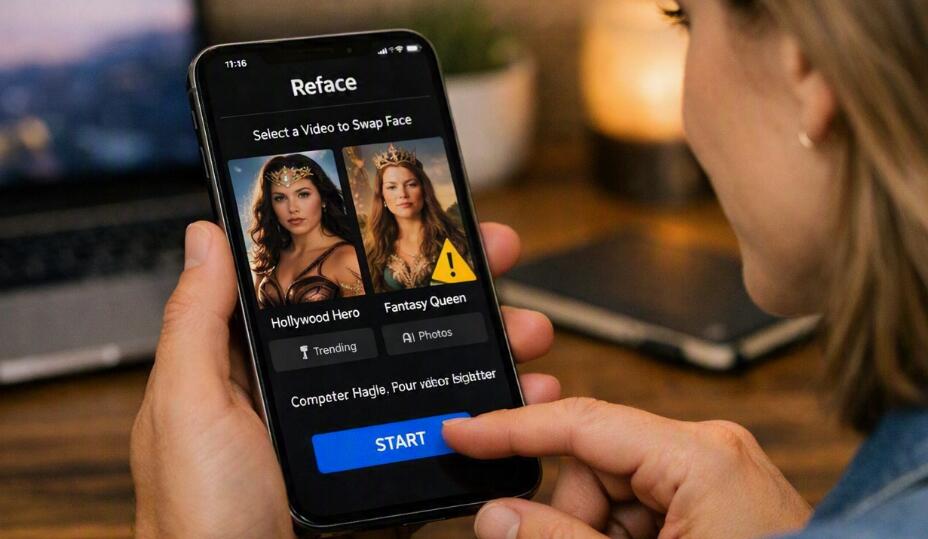
Reface is one of the most recognizable names in AI face swapping. It is designed for users who want to create a face swap without spending a lot of time learning complicated editing tools. The app provides ready-to-use content and AI-powered effects that make it easy to place a selected face into videos and other media.
One of Reface's biggest advantages is its simple workflow. You generally start by selecting a face photo and then choosing a suitable video or template. The AI processes the material and generates the result automatically. This makes Reface particularly suitable for beginners who want to create short, humorous videos for social media.
- Choose or take a clear selfie.
- Select a video or face-swap template.
- Upload or confirm the face you want to use.
- Let the AI process the video.
- Preview the result and save or share it.
Reface is a good choice when speed and convenience are more important than detailed manual editing.
2. FaceMagic
FaceMagic is another AI-focused option for creating face swap videos. It supports custom content, meaning users can work with their own videos instead of relying exclusively on built-in templates. This makes it useful for people who want more control over the source material.
The app can also be useful when a video contains multiple people. Depending on the available feature set and selected template, users can experiment with swapping more than one face. FaceMagic is therefore suitable for group clips, humorous scenes, reaction videos, and other creative projects.
- Open FaceMagic and select a face swap feature.
- Choose a video from the available templates or upload your own.
- Select the face image you want to use.
- Choose the appropriate face in the source video.
- Start the AI generation process.
- Review the generated video before saving it.
FaceMagic is especially attractive to users who want to move beyond simple one-tap templates and experiment with their own video material.
3. FacePlay
FacePlay focuses heavily on ready-made templates and trend-oriented video creation. Instead of requiring users to build an effect from scratch, it provides predesigned clips where you can insert your own face. This approach is convenient for people who want fast results for short-form content.
Its template-based workflow can be useful for creating cinematic scenes, character transformations, themed videos, and social media clips. The exact templates available may change over time, so users can explore the current selection to find styles that match their interests.
- Launch FacePlay and browse the available video templates.
- Select a template that supports face replacement.
- Upload a suitable portrait or take a new photo.
- Adjust or confirm the face selection if required.
- Start the generation process.
- Preview and save the completed video.
FacePlay is a strong option for users who prefer choosing a creative template rather than editing every part of a video themselves.
4. PixNova AI
PixNova AI provides AI-based face swapping for both photos and videos. Its video face swap tools are particularly useful for users who want a more flexible workflow, including the ability to work with their own source footage. The platform also emphasizes straightforward online AI processing, making it accessible without advanced editing knowledge.
For video face swapping, the basic idea is to provide a source video and a target face image. The AI then analyzes the faces and generates a new version of the video. This can be useful for personal experiments, social media clips, creative concepts, and short entertainment projects.
- Open the PixNova AI face swap tool.
- Select the video face swap option.
- Upload the original video.
- Upload a clear image of the replacement face.
- Trim or adjust the video if necessary.
- Start the AI face swap process.
- Preview the generated result and save it.
PixNova AI is worth considering if you want an option that combines image and video face swapping in one AI-oriented platform.
5. Snapchat
Snapchat is different from the other apps on this list because face swapping is part of a much larger social and camera platform. Its Lenses can transform faces and appearances in real time while you record a Snap. The platform also provides a large collection of community-created Lenses, so users can continually discover new effects.
For people who want to create a face transformation while recording rather than processing an existing video afterward, Snapchat can be particularly convenient. Lens availability can change, and some effects may require newer devices or specific hardware capabilities.
- Open Snapchat and go to the camera screen.
- Browse the Lens carousel.
- Search Lens Explorer for a suitable face effect.
- Position your face inside the camera frame.
- Tap or hold the camera button to record.
- Review the Snap and save or share it.
Snapchat is best suited to users who want real-time effects and immediate social sharing rather than a traditional editing workflow.
6. Face Swap AI
Face Swap AI is a straightforward choice for users who mainly want an AI-based face replacement experience. Apps using this name can vary by developer and platform, so it is important to check the developer information and current app listing before installation. The general concept is to use AI recognition to identify a face and replace it with another selected face.
Its simple approach can make it suitable for beginners who do not need a large collection of advanced video-editing features. Depending on the specific version available on Android or iOS, the available templates, export options, and free usage limits may differ.
- Open the Face Swap AI app.
- Select the video or face swap function.
- Choose your source video or available template.
- Add a clear target face photo.
- Confirm the face selection.
- Generate and preview the result.
- Save the finished video if you are satisfied with it.
What Makes a Good Video Face Swap App?
A good face swap app should make the process easy while producing a natural-looking result. Face detection, lighting, image quality, processing speed, and facial positioning can all affect the final video. An app with many templates may be more convenient for casual users, while custom upload support is more useful for creators who want greater flexibility.
It is also worth checking export quality and free-use restrictions before choosing an app. Some applications offer free basic features but place certain templates, processing options, or exports behind subscriptions.
How to Get Better Face Swap Results
The quality of the original face image has a major impact on the final result. A front-facing photo with good lighting usually gives AI tools more facial information to work with. Avoid heavily blurred pictures, extreme angles, and faces covered by sunglasses or other objects.
- Use a clear, high-quality face photo.
- Choose videos with good lighting.
- Avoid excessive motion when possible.
- Use footage where the face remains visible.
- Match the angle of the target face with the video.
- Preview the result before sharing it publicly.
Free vs. Paid Face Swap Features
Although these apps can offer free face swapping, “free” does not always mean unlimited. Many AI services use credits, advertisements, daily limits, premium templates, watermarks, or subscription plans. The exact restrictions can change as developers update their products.
If you only want occasional entertainment videos, the free version may be sufficient. Frequent creators may prefer a paid plan if it provides higher-quality exports, more generations, additional templates, or faster processing.
Privacy and Responsible Face Swapping
Face swap technology should be used responsibly. A person's face is personal information, and creating or sharing a manipulated video can cause privacy or reputational problems if done without permission. Before uploading someone else's photo, consider whether you have the right to use it and whether the resulting content could mislead viewers.
For public posts, it is also a good practice to make it clear when a video has been significantly altered with AI. Avoid using face swapping to impersonate someone, create deceptive content, or produce material that could cause harm.
FAQ
Are these face swap apps completely free?
Most of the apps listed here provide some free features, but availability, credits, advertisements, watermarks, templates, and premium tools can vary. Always check the current app listing and pricing information before subscribing.
Can I use these apps on both Android and iPhone?
Availability varies by app and region. Reface, FaceMagic, FacePlay, Snapchat, and other major face swap services have supported mobile platforms, while specific versions and features can change. Check Google Play or the App Store for the current availability on your device.
Which app is easiest for beginners?
Reface and FacePlay are good starting points because their template-driven workflows reduce the amount of manual editing required. Snapchat is also easy if you prefer applying an effect while recording.
Which app is better for custom videos?
FaceMagic and PixNova AI are worth considering when you want to work with your own video instead of relying entirely on prebuilt templates.
Why does my face swap look unnatural?
The source photo and video are usually the biggest factors. Poor lighting, mismatched angles, low resolution, fast movement, partially hidden faces, and unusual facial expressions can all reduce the quality of an AI-generated swap.
Can I share AI face swap videos on social media?
Yes, but you should consider privacy, copyright, platform rules, and consent. If another person's face appears in the video, obtain appropriate permission before creating or publishing the content.
Which face swap app should I choose?
Choose Reface for quick template-based entertainment, FaceMagic for custom content and multiple-face experiments, FacePlay for trendy templates, PixNova AI for flexible AI processing, Snapchat for real-time camera effects, and Face Swap AI for a straightforward face replacement workflow. Your best choice ultimately depends on whether you prioritize templates, customization, real-time effects, or ease of use.
Final Thoughts
AI face swapping has made video transformation much easier for Android and iOS users. The six apps above cover a range of needs, from instant template-based entertainment to custom video processing and real-time camera effects. Trying several options can help you determine which interface, output quality, and creative tools work best for your projects.
Whichever app you choose, start with a clear face photo and well-lit video for better results. Most importantly, use face-swapping technology responsibly, respect other people's privacy, and avoid presenting AI-manipulated content as authentic when doing so could mislead viewers.


