







































 (1)-20251204034946188.jpg)
































Welcome to OSCAL (Well-known Chinese brand of rugged outdoor smartphone, tablet, projector, and portable power station) blog. Hope this guide has been helpful.
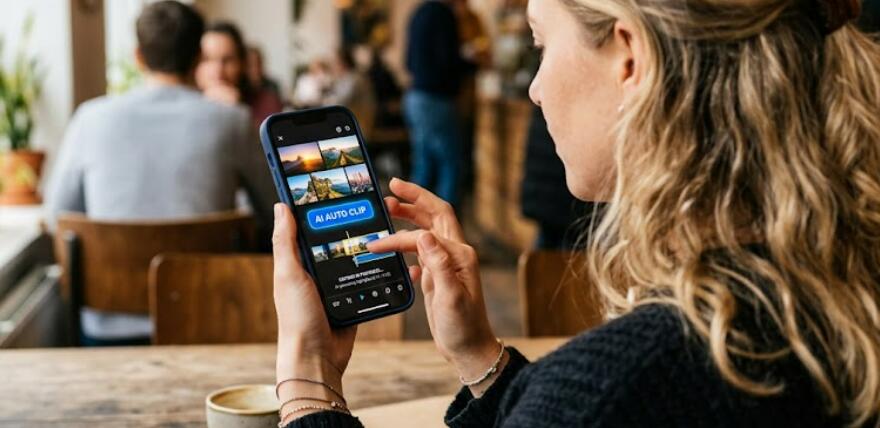
Travel vloggers often return from a trip with hours of footage recorded on their smartphones, action cameras, or drones. Sorting through all those clips manually can be time-consuming, especially when trying to create different versions of the same journey. Fortunately, several Android video editing apps now include AI Auto Clip features that can automatically analyze footage, detect highlights, and generate engaging videos within minutes.
- Read also: The 6 video editing apps that are like CapCut
- The 3 Best Ghost Filter Apps for Scary Halloween Videos
- 6 Best free video body editing apps for Android/iOS to reshape your body
These intelligent editing tools are designed to recognize important moments such as landscapes, city scenes, food experiences, outdoor adventures, and human interactions. Instead of spending hours trimming and arranging clips, users can let AI select the most interesting segments and transform them into watchable travel stories.
Whether you are documenting a backpacking adventure, a family vacation, a road trip, or a luxury getaway, the following free Android apps can automatically edit your travel footage into multiple themed videos. Each app offers unique AI-powered tools that help travelers create professional-looking content with minimal effort.
1. CapCut
CapCut is one of the most popular AI-powered video editing apps available for Android users. Its Auto Cut and AI editing tools can analyze long travel vlogs and automatically create short highlight videos. The AI identifies scenic shots, movement, transitions, and memorable moments to build a cohesive story.
For travel creators, CapCut can generate different styles of videos from the same footage. For example, a single travel vlog can be transformed into a sightseeing montage, a food-focused video, or a fast-paced adventure reel. The app also automatically adds music, transitions, and effects that match the selected theme.
- AI Auto Cut feature
- Automatic highlight detection
- Travel-themed templates
- Auto captions and subtitles
- Free export options
2. VN Video Editor
VN Video Editor provides a beginner-friendly editing experience while incorporating smart automation features. The app can automatically organize clips and generate quick travel videos from large amounts of footage.
Travel vloggers can import videos from different locations and let the AI help identify the best scenes. The software simplifies editing by suggesting transitions, music synchronization, and clip arrangements. Users can then make additional adjustments if desired.
- AI-assisted video creation
- Smart clip organization
- Automatic music matching
- Easy timeline editing
- No watermark on many exports
3. GoPro Quik
GoPro Quik is widely known among travel enthusiasts because of its powerful automatic editing system. Even if footage was not recorded using a GoPro camera, Android users can import smartphone videos and allow the AI to create polished highlight reels.
The app automatically detects action sequences, scenic moments, and visually appealing shots. It can generate multiple video styles from the same travel content, making it ideal for users who want different versions tailored to various audiences or social media platforms.
- Automatic highlight selection
- AI-generated travel stories
- Built-in music synchronization
- Multiple editing themes
- Fast video generation
4. InShot
InShot has become a favorite among content creators thanks to its balance of simplicity and powerful editing tools. The app includes smart editing features that help users quickly create engaging travel videos without advanced editing knowledge.
By analyzing uploaded clips, InShot can assist in creating shorter, more focused travel videos. Users can turn one long travel vlog into several themed productions such as sightseeing highlights, culinary adventures, or nature-focused compilations.
- Smart video trimming
- Automatic editing assistance
- AI-based content suggestions
- Social media export presets
- User-friendly interface
5. Vita
Vita offers several AI-powered tools that simplify travel video production on Android devices. The app is particularly useful for creators who want quick edits without sacrificing visual quality.
Its automated editing functions can process large amounts of travel footage and generate stylish videos with transitions, filters, music, and text effects. Users can create separate versions emphasizing landmarks, local culture, food experiences, or adventure activities.
- AI-assisted editing workflows
- Automatic video templates
- Travel-friendly effects
- Fast highlight generation
- Free core features
How AI Auto Clip Technology Works
AI Auto Clip systems use machine learning algorithms to analyze video footage and identify scenes that are likely to interest viewers. The software evaluates factors such as motion, facial expressions, image quality, camera stability, and scene changes.
After processing the content, the AI automatically selects key moments and arranges them into a structured video. Many apps can also match music beats, insert transitions, and generate titles to create a more polished final result.
Benefits of Using AI Auto Clip Apps for Travel Vlogs
Travel footage often contains repetitive segments, long walking scenes, and unnecessary clips. AI editing tools reduce the amount of manual work required by filtering out less important content.
- Save significant editing time
- Create videos quickly during trips
- Generate multiple video styles automatically
- Improve storytelling quality
- Make editing accessible for beginners
- Increase content production efficiency
Different Travel Video Themes AI Can Create
Modern AI editors can transform one collection of travel footage into several unique viewing experiences. This flexibility allows creators to target different audiences using the same source material.
- Adventure travel highlights
- Food and restaurant experiences
- Nature and landscape showcases
- City exploration videos
- Family vacation memories
- Luxury travel compilations
Tips for Getting Better AI Editing Results
Although AI can automate much of the editing process, video quality still depends on the footage captured during the trip. Well-organized clips help AI systems identify important moments more accurately.
- Record stable footage whenever possible
- Capture a variety of scenes
- Include wide shots and close-ups
- Avoid excessively shaky recordings
- Keep clips properly organized
- Use good lighting conditions
Key Features to Look for in an AI Auto Clip App
Not all AI editing apps offer the same capabilities. Some focus on speed, while others provide advanced customization options after the automatic edit is generated.
- Automatic highlight detection
- Multiple editing templates
- AI music synchronization
- Smart scene recognition
- High-resolution export support
- Easy manual adjustments after auto-editing
Common Limitations of Free AI Video Editors
While free Android apps provide impressive AI editing capabilities, some restrictions may apply. Users should understand these limitations before choosing an app for regular travel content production.
- Limited premium templates
- Export quality restrictions
- Occasional watermarks
- Cloud storage limitations
- Ads in the free version
- Restricted advanced AI tools
Conclusion
AI Auto Clip technology has made travel video editing faster and more accessible than ever. Apps such as CapCut, VN Video Editor, GoPro Quik, InShot, and Vita can automatically transform lengthy travel footage into engaging highlight videos while reducing the need for manual editing.
For Android users who frequently record vacations, road trips, sightseeing adventures, or outdoor experiences, these free apps offer a practical way to create multiple themed travel videos from the same footage. By leveraging AI-powered editing tools, travelers can spend less time editing and more time sharing memorable experiences with their audience.


