









































 (1)-20251204034946188.jpg)

































Welcome to OSCAL (Well-known Chinese brand of rugged outdoor smartphone, Android tablet, projector, and portable power station) blog. Hope this guide has been helpful.
In recent years, AI-powered image transformation tools have exploded in popularity, offering creative ways to reimagine everyday photos. One particularly fun trend is the “Lego filter,” which converts ordinary images into colorful, blocky masterpieces that resemble iconic Lego creations. Whether you’re transforming a selfie, a pet photo, or a landscape, these tools provide a playful and nostalgic aesthetic that appeals to all ages.
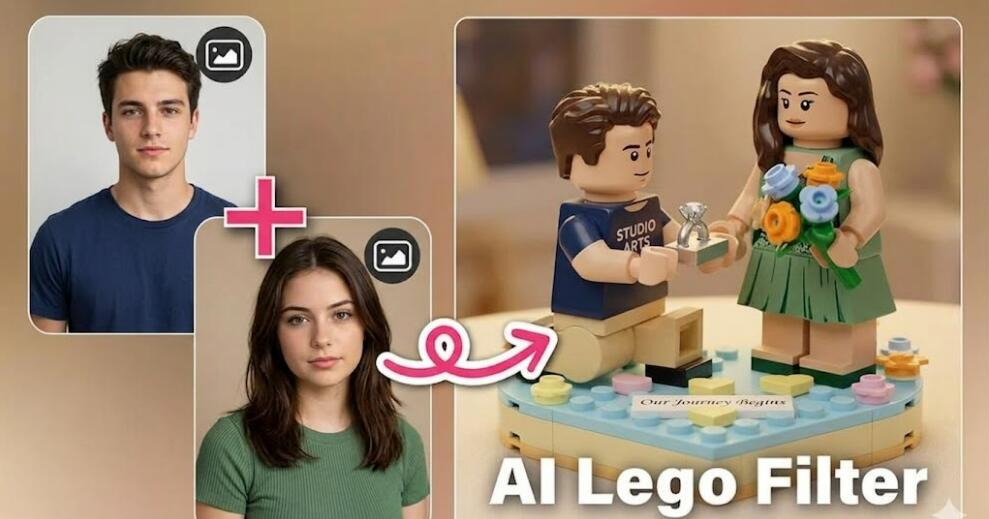
The appeal of Lego-style art lies in its combination of simplicity and detail. The familiar block structure, combined with vibrant colors and recognizable forms, creates a unique visual style that feels both retro and modern. Thanks to advancements in AI, generating this effect is now incredibly easy—even for users with no design experience.
This guide introduces four powerful apps that let you turn photos into Lego-style art using AI: Bylo.ai, Media.io, EaseMate AI, and OpenArt.
4 Apps with an AI Lego Filter
- Bylo.ai
- Media.io
- EaseMate AI
- OpenArt
Bylo.ai
Bylo.ai is a modern AI-powered creative platform designed for fast and visually appealing transformations. Its Lego filter stands out due to its ability to preserve fine details while converting images into block-based designs. Users simply upload a photo, select the Lego-style filter, and let the AI handle the rest.
One of the strongest aspects of Bylo.ai is its user-friendly interface. Even beginners can navigate the platform with ease, thanks to its minimalistic design and clear instructions. The processing speed is also impressive, allowing users to generate Lego-style images within seconds.
Additionally, Bylo.ai offers customization features such as color intensity adjustments and block size variations. This allows users to fine-tune their Lego artwork, making it ideal for both casual fun and more polished creative projects.
Media.io
Media.io is a versatile online media toolkit that includes a wide range of AI-powered editing features, including a Lego photo filter. Known for its reliability, Media.io provides consistent results with balanced colors and accurate subject representation.
The platform is entirely web-based, which means users don’t need to download any software. This makes it highly accessible across devices, whether you’re using a desktop, tablet, or smartphone. Its drag-and-drop functionality further simplifies the process.
Another advantage of Media.io is its integration with other editing tools. After applying the Lego filter, users can enhance their images with additional effects, resize them for social media, or convert formats—all within the same platform.
EaseMate AI
EaseMate AI focuses on delivering high-quality artistic transformations with minimal effort. Its Lego filter is particularly effective at creating clean, structured visuals that resemble real Lego builds. The AI intelligently maps image regions into block patterns while maintaining recognizable shapes.
The platform emphasizes automation, making it ideal for users who want quick results without tweaking too many settings. Simply upload your image, choose the Lego effect, and download the finished artwork in moments.
EaseMate AI also supports batch processing, allowing users to convert multiple photos at once. This is especially useful for content creators or marketers who need consistent visual styles across several images.
OpenArt
OpenArt is a powerful AI art generator that goes beyond simple filters. Its Lego-style transformation is part of a broader suite of artistic tools that allow users to experiment with different styles and prompts.
What sets OpenArt apart is its flexibility. Users can combine the Lego filter with other artistic effects or use text prompts to guide the AI’s output. This opens up endless creative possibilities, from realistic Lego portraits to abstract block-based compositions.
OpenArt also has a strong community aspect, where users can explore and share creations. This makes it an excellent choice for those looking for inspiration or wanting to showcase their Lego-style artwork.
How AI Lego Filters Work
AI Lego filters rely on deep learning models trained to recognize shapes, colors, and textures in images. These models reinterpret the original photo by breaking it down into simplified geometric forms that mimic Lego bricks.
The process typically involves segmentation, where the AI identifies different parts of the image, followed by stylization, where these segments are converted into block-like structures. The result is a cohesive image that retains the essence of the original while adopting a playful Lego aesthetic.
Best Use Cases for Lego Art
Lego-style images are perfect for social media content, profile pictures, and creative gifts. They add a fun twist to otherwise ordinary photos and often attract attention due to their unique look.
They’re also popular in marketing campaigns, especially for brands targeting younger audiences or promoting creativity. Additionally, Lego art can be used in educational settings to make visual content more engaging.
Tips for Better Results
- Use high-resolution images for clearer output
- Choose photos with good lighting and contrast
- Avoid overly complex backgrounds
- Experiment with different apps for varied styles
Advantages of Using AI Lego Filters
One major advantage is accessibility—anyone can create Lego-style art without design skills. The process is fast, often taking just seconds to complete.
Another benefit is consistency. AI ensures uniform results across multiple images, making it ideal for branding or themed projects.
Limitations to Consider
Despite their strengths, AI Lego filters are not perfect. Some tools may struggle with highly detailed images or produce overly simplified results.
Additionally, customization options can vary between platforms. Users seeking precise control may need to try multiple apps to achieve their desired outcome.
FAQ
1. Are AI Lego filters free to use?
Many platforms offer free versions, but some advanced features may require payment.
2. Do I need design skills?
No, these tools are designed for beginners and require no prior experience.
3. Can I use the images commercially?
It depends on the app’s terms of service, so always check usage rights.
4. Which app is best for beginners?
Bylo.ai and Media.io are particularly user-friendly for first-time users.
5. Can I edit the Lego image after creation?
Yes, many platforms allow further editing or exporting to other tools.
6. What image formats are supported?
Most apps support common formats like JPG and PNG.
7. Is there a mobile version available?
Media.io and OpenArt work well on mobile browsers, while others may offer dedicated apps.
Conclusion
AI Lego filters provide a fun and creative way to transform everyday photos into something unique and visually striking. With tools like Bylo.ai, Media.io, EaseMate AI, and OpenArt, anyone can explore this trend with minimal effort.
Whether you’re creating content for social media, designing a gift, or simply experimenting with digital art, these apps make it easy to bring your ideas to life in a playful Lego-inspired style.


