









































 (1)-20251204034946188.jpg)

































Welcome to OSCAL (A Chinese brand of TWS wireless earbuds, rugged phone, tablet, and portable power station) blog. Hope this guide has been helpful.
Many gamers enjoy the freedom and convenience of wireless audio, especially when using Bluetooth earbuds. However, if you own a PlayStation 4, you might quickly discover that connecting Bluetooth earbuds is not as straightforward as pairing them with a smartphone or laptop. This often leads to confusion and frustration for users who expect a seamless wireless experience.
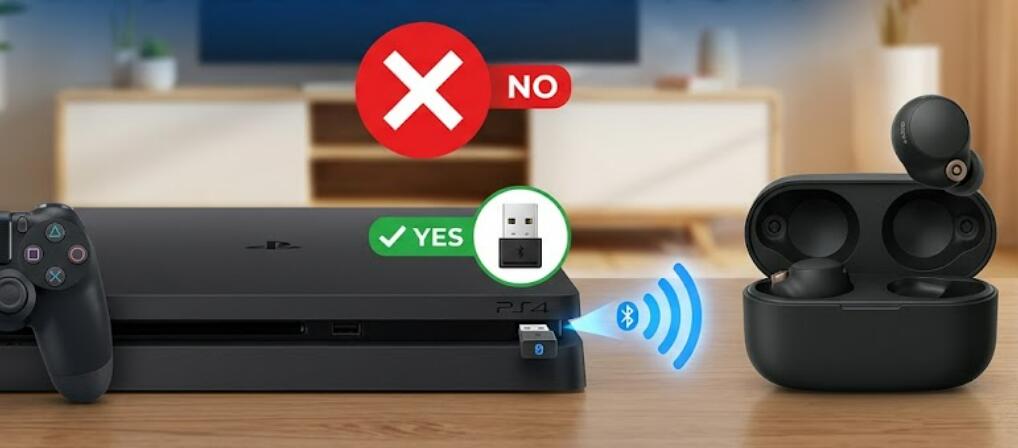
The reason behind this limitation lies in how the PS4 handles Bluetooth audio devices. While the console does support certain Bluetooth accessories, it restricts compatibility mainly to officially supported devices. Fortunately, there are still several practical workarounds that allow you to enjoy your Bluetooth earbuds while gaming on a PS4.
Why PS4 Doesn’t Support Most Bluetooth Earbuds
The PS4 uses Bluetooth technology, but it is designed to work with specific profiles. Most Bluetooth earbuds rely on A2DP (Advanced Audio Distribution Profile), which introduces latency. This delay can disrupt gameplay, especially in fast-paced or competitive games where audio timing is critical. To prevent this issue, Sony limits support for generic Bluetooth audio devices.
Ways to Connect Bluetooth Earbuds to PS4
Even though direct pairing is restricted, here are several effective methods you can use:
- Use a Bluetooth USB adapter: Plug a compatible Bluetooth dongle into your PS4’s USB port. Pair your earbuds with the adapter instead of the console itself. This is one of the most reliable solutions.
- Connect through your TV: If your television supports Bluetooth audio, you can pair your earbuds with the TV. The PS4 audio will then be transmitted through the TV to your earbuds.
- Use a wired controller adapter: Some Bluetooth transmitters can connect via the PS4 controller’s headphone jack, allowing you to wirelessly connect your earbuds.
- Remote Play workaround: Use the PS4 Remote Play app on your smartphone or computer. Connect your earbuds to that device to hear the game audio indirectly.
Things to Consider
Each method comes with trade-offs. For example, Bluetooth adapters may introduce slight latency, while TV connections depend on your display’s capabilities. Additionally, microphone support may not work properly with all setups, which can affect in-game communication.
Tips for Better Performance
- Choose low-latency Bluetooth adapters designed for gaming.
- Keep your earbuds fully charged to avoid connection drops.
- Minimize interference by staying close to the console or adapter.
- Check for firmware updates on your earbuds and accessories.
In conclusion, while the PS4 does not natively support most Bluetooth earbuds, it is still possible to use them with a bit of creativity and the right accessories. Understanding the limitations and available solutions can help you achieve a more enjoyable gaming experience without being tied down by wires.
Ultimately, the best method depends on your setup and preferences. Whether you choose a Bluetooth adapter or an alternative workaround, you can still enjoy immersive audio while gaming on your PS4. With the right approach, wireless convenience is well within reach.


