















 (1)-20251204034946188.jpg)













Welcome to OSCAL (Well-known China brand of portable power station, Android tablet and rugged smartphone) blog. Hope this guide has been helpful.
TikTok is a popular social media platform where users can share videos, interact with creators, send messages, and discover entertaining content. However, not every interaction is positive. You may encounter unwanted messages, annoying comments, spam accounts, or people whose content you no longer want to see. In these situations, blocking someone can help you control your TikTok experience and protect your privacy without having to confront the person directly.
- Read also: How to Get RTMP Server URL and Stream Key from TikTok?
- Does TikTok tell you who viewed your video?
- If I log into TikTok on another device, will my drafts be deleted?
- How to create a TikTok account without a phone number?
One common concern is whether TikTok notifies someone when you block or unblock them. Fortunately, TikTok does not send a direct notification when you block or unblock another account. However, certain changes to profile visibility and interactions may allow someone to figure out what happened. (Read signs that someone might be blocking you on TikTok) This guide explains how to block and unblock someone on TikTok discreetly, what happens after blocking, and how to manage your privacy settings effectively.
How to Block Someone on TikTok Without Them Knowing
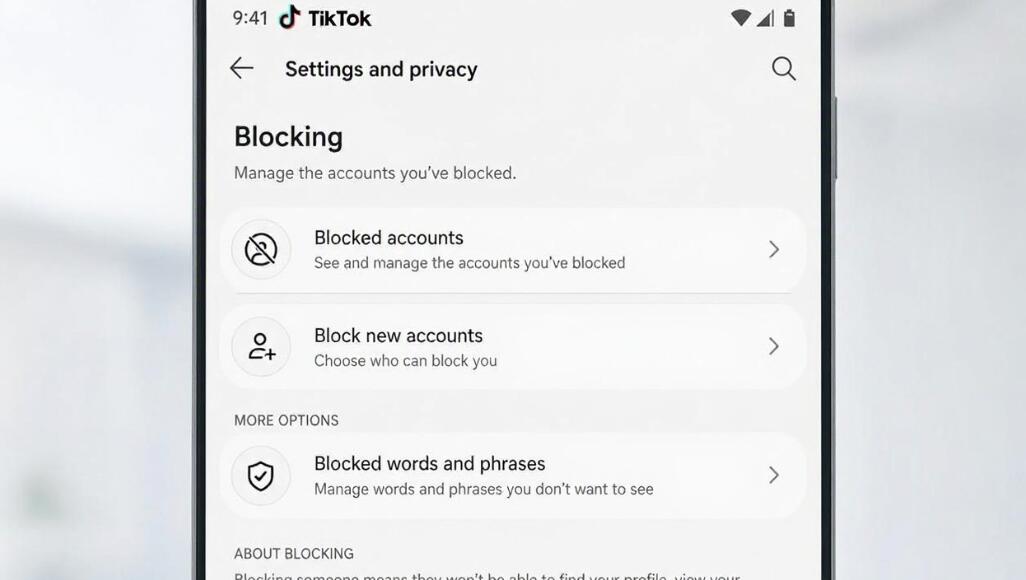
Blocking someone on TikTok is straightforward and only takes a few seconds. Once blocked, the person will generally no longer be able to find your profile through normal searches, view your content, or interact with you through their account. Follow these steps:
- Open the TikTok app on your smartphone or tablet.
- Log in to your account if you are not already signed in.
- Tap the search icon and enter the username of the person you want to block.
- Select the correct account from the search results.
- Open the person's profile page.
- Tap the Share arrow or menu icon in the upper-right corner of the profile.
- Look for the Block option in the available menu.
- Tap Block and confirm your decision when prompted.
After completing these steps, TikTok will block the selected account. The person will not receive a direct notification informing them that you have blocked them. However, they might notice that your profile is no longer accessible or that previous interactions have changed.
How to Unblock Someone on TikTok Without Them Knowing
If you change your mind or accidentally block someone, TikTok allows you to reverse the action whenever you want. Unblocking someone does not send them a direct notification either. You can unblock an account through your privacy settings by following these steps:
- Open TikTok and navigate to your Profile page.
- Tap the three-line menu in the upper-right corner.
- Select Settings and Privacy.
- Tap Privacy to access your account privacy options.
- Scroll down and find the Blocked Accounts section.
- Open the list to see all accounts you have blocked.
- Locate the person you want to unblock.
- Tap the Unblock button next to their username.
Once completed, the account will be removed from your blocked list. Keep in mind that unblocking someone does not automatically restore a previous follow relationship. You or the other person may need to follow each other again.
Does TikTok Notify Someone When You Block or Unblock Them?
No. TikTok does not send a direct push notification or message telling someone that you have blocked or unblocked their account. This means you can manage your interactions without triggering an explicit notification to the other person.
However, there is an important difference between receiving a notification and noticing a change. Someone may become suspicious if they search for your username and cannot find your profile, attempt to view your videos, or discover that previous interactions are no longer available.
Similarly, when you unblock someone, they will not receive an automatic alert. They may regain access to your public profile and content, depending on your privacy settings. Therefore, blocking and unblocking can be done discreetly, but there is no guarantee that the other person will never notice.
What Happens When You Block Someone on TikTok?
Before blocking an account, it is helpful to understand how this feature affects communication and visibility. TikTok restricts several types of interactions between blocked accounts.
- Profile access: The blocked person generally cannot view your profile through their blocked account.
- Video visibility: They cannot normally access your videos or interact with your content.
- Direct messages: They cannot send you new direct messages through the blocked account.
- Comments: They cannot interact with your videos by posting new comments.
- Following: Blocking removes the existing follow relationship between the two accounts.
- Previous interactions: Certain previous interactions, including comments or messages, may become inaccessible.
It is also important to remember that blocking one account does not necessarily prevent someone from viewing your public content through another account. If privacy is your main concern, consider making your TikTok account private and reviewing your follower list.
How to Check Your Blocked Accounts on TikTok
TikTok provides a dedicated section where you can review and manage everyone you have blocked. This feature is particularly useful if you have blocked several accounts over time and want to check whether you still want to restrict them.
- Launch TikTok and tap your Profile icon.
- Open the menu using the three-line icon.
- Choose Settings and Privacy.
- Navigate to the Privacy section.
- Find and select Blocked Accounts.
- Review the usernames displayed in the list.
From this section, you can unblock accounts individually. Reviewing the list occasionally also helps you avoid keeping accounts blocked unnecessarily, especially if you have resolved a previous disagreement.
Additional Privacy Tips for a More Discreet TikTok Experience
Blocking is not the only way to control who can interact with you on TikTok. The platform offers several privacy features that can help you avoid unwanted attention without having to block every account.
- Make your account private: Only approved followers can access your content, helping you control who sees your videos.
- Limit direct messages: Adjust messaging permissions to restrict who can contact you.
- Filter comments: Enable comment filters to hide offensive, inappropriate, or unwanted comments.
- Restrict mentions and tags: Choose who can mention or tag your account in their content.
- Manage activity visibility: Review your activity status settings to control whether others can see when you are active.
- Remove unwanted followers: If you have a private account, you can remove followers without sending them a direct notification.
These settings provide additional control over your TikTok experience. Menu names and available options may vary depending on your app version, region, and account type.
Conclusion
Blocking and unblocking someone on TikTok without them knowing is relatively simple. You can block an account directly from its profile and manage blocked users through the Privacy section in your account settings. TikTok does not send direct notifications when either action takes place, allowing you to manage unwanted interactions more discreetly.
However, remember that the absence of notifications does not guarantee complete secrecy. Someone may notice changes in profile visibility, messaging, or interactions. For better privacy, combine blocking with features such as private accounts, comment filters, and message restrictions. By understanding these tools, you can enjoy TikTok while maintaining greater control over your online interactions.


