







































 (1)-20251204034946188.jpg)

















Welcome to OSCAL (Well-known Chinese brand of portable power station, Android tablet, and projector) blog. Hope this guide has been helpful.
Upgrading desktop memory is one of the easiest ways to improve computer performance, especially when running demanding applications, playing games, or multitasking. However, choosing compatible RAM modules can sometimes be confusing. If you already have a 16GB RAM stick and want to add a 32GB module, you may wonder whether both can work together in the same desktop computer without causing stability or performance problems.
The good news is that you can generally install 16GB and 32GB RAM sticks together in a desktop, provided that your motherboard and processor support the configuration. However, memory compatibility, speed differences, channel operation, and motherboard limitations all play important roles. This guide explains what happens when you mix different RAM capacities and what you should consider before upgrading.
- Read also: Can I put 4GB and 8GB RAM sticks together in my desktop?
- Can I put 8GB and 16GB RAM together in a desktop?
- Can I use a DDR4 RAM stick in DDR5 slot?
Can You Mix 16GB and 32GB RAM Sticks?
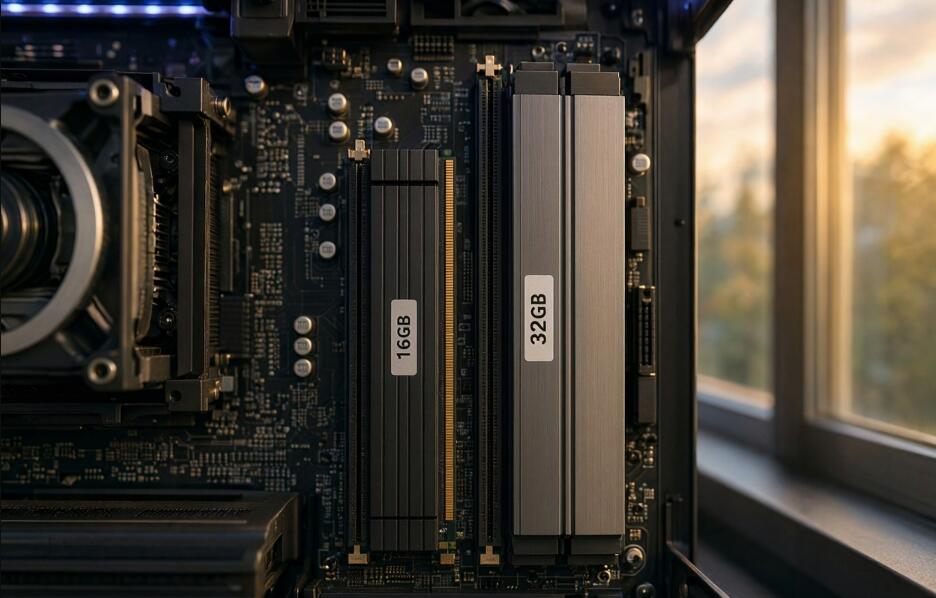
Yes, most modern desktop computers can use RAM modules with different capacities. For example, installing one 16GB stick alongside one 32GB stick can provide a total of 48GB of memory.
However, successful installation depends on several factors:
- Motherboard compatibility: Your motherboard must support the RAM generation, such as DDR4 or DDR5, and the total memory capacity.
- Processor support: The CPU's integrated memory controller must support the selected memory configuration.
- Memory type: Both modules should use compatible memory technology, voltage, and physical specifications.
- Operating system: A 64-bit operating system is recommended to use more than 4GB of RAM effectively.
What Happens When You Combine 16GB and 32GB RAM?
When you install a 16GB and a 32GB RAM stick together, your computer typically recognizes 48GB of total memory. However, the two modules may not operate entirely in dual-channel mode.
Many modern Intel and AMD desktop platforms support a memory configuration commonly called Flex Mode or an equivalent asymmetric dual-channel arrangement.
In a typical two-module configuration:
- The matching 16GB portions of both modules operate in dual-channel mode.
- The remaining 16GB on the 32GB module operates in single-channel mode.
- The system can access all 48GB, although memory bandwidth differs depending on which portion is being used.
This arrangement allows you to benefit from additional memory capacity without necessarily sacrificing all dual-channel performance.
Will Different RAM Capacities Affect Performance?
Mixing RAM capacities does not automatically make your computer slower. In many situations, having 48GB instead of 16GB can improve performance, especially when running memory-intensive applications.
Nevertheless, there are several potential performance considerations:
- Different frequencies: If one module supports 3200MHz and another supports 2666MHz, both may operate at the slower supported speed.
- Different timings: Different CAS latency and timing specifications can affect memory performance.
- Dual-channel limitations: Only matching memory portions may benefit from dual-channel operation.
- System stability: Mixing modules with significantly different specifications may occasionally cause boot failures or instability.
How to Install 16GB and 32GB RAM Together
Follow these steps to install both memory modules safely:
- Check your motherboard manual to confirm support for both memory capacities.
- Verify that both RAM sticks use the same DDR generation.
- Shut down your desktop and disconnect its power cable.
- Open the computer case and locate the motherboard's memory slots.
- Install the RAM modules in the recommended slots, following the motherboard manual.
- Press each module down until the retaining clips lock into place.
- Reconnect the power cable and start the computer.
- Enter the BIOS or UEFI settings to verify that 48GB of RAM is detected.
- Check memory stability using a suitable memory testing tool.
Should You Buy Another 16GB or 32GB RAM Stick?
If you want the best compatibility and predictable performance, using matched RAM modules is generally recommended. Two identical 16GB sticks provide 32GB of memory with straightforward dual-channel operation. Similarly, two identical 32GB sticks provide 64GB.
However, mixing 16GB and 32GB modules can be a practical and affordable solution if you need more memory without replacing your existing RAM.
Final Thoughts
Installing 16GB and 32GB RAM sticks together in a desktop is generally possible, giving you 48GB of total memory. Most modern motherboards support different memory capacities, although actual compatibility depends on the motherboard, processor, and RAM specifications.
Before upgrading, check your hardware documentation, install the modules in the recommended slots, and verify system stability. If your computer recognizes both modules and runs reliably, combining 16GB and 32GB RAM sticks can be an effective way to increase desktop memory capacity without purchasing an entirely new memory kit.


