
















 (1)-20251204034946188.jpg)


















Welcome to OSCAL (Well-known Chinese brand of Android smartwatch, rugged smartphone, tablet, projector, and portable power station) blog. Hope this guide has been helpful.
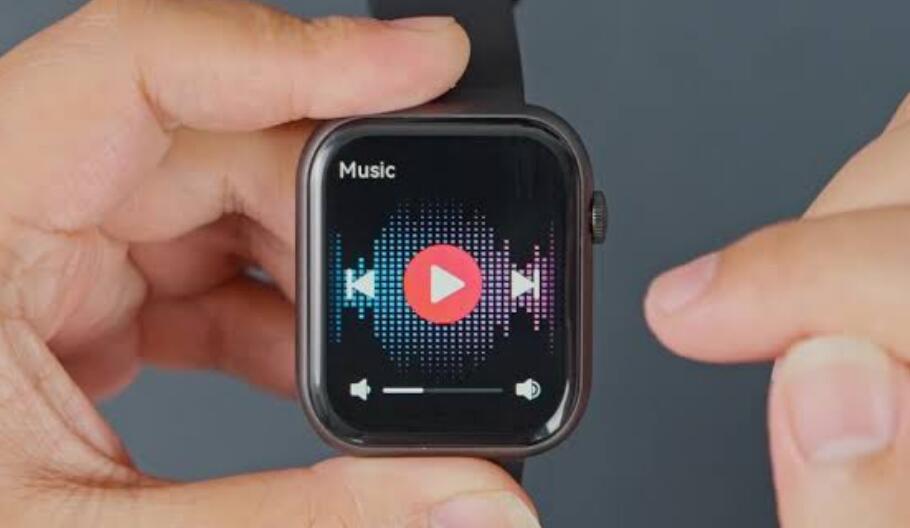
Yes, many modern smartwatches can play music without being connected to a phone at the time of playback. Whether this is possible depends on the watch model, its storage capacity, supported music services, and whether it has Wi-Fi or cellular connectivity. Some watches let you download songs directly to the device, while others can stream music independently when connected to a Wi-Fi or cellular network.
- Read also: Which is the best kids watch with SIM card slot?
- Which is the best kids watch with camera?
- Is it safe to wear smartwatch while sleeping?
This makes a smartwatch useful for workouts, running, walking, and other situations where carrying a smartphone is inconvenient. Before leaving your phone behind, however, you need to prepare the watch and music properly. The following guide explains how independent music playback works and what you should check before using your smartwatch without a phone.
How to Determine Whether Your Smartwatch Can Play Music Alone
Use the following steps to determine whether your smartwatch supports phone-free music playback:
- Check the watch specifications to see whether it has built-in music storage.
- Check whether the watch supports downloading music or playlists for offline playback.
- Check whether your preferred music service offers a smartwatch app.
- Look for Wi-Fi or cellular connectivity if you want to stream music without a phone.
- Check whether Bluetooth headphones or earbuds can connect directly to the smartwatch.
- Review the music service's subscription requirements for offline listening or streaming.
- Download music to the watch and test playback while the phone is disconnected.
If the watch supports offline downloads, a phone is generally not required during playback. If it only supports remote control, however, the phone may still be necessary because the watch is controlling music that is actually playing from the phone.
Offline Music Playback
Offline playback is one of the simplest ways to listen without a phone. Compatible smartwatches can store music locally, allowing songs, albums, or playlists to remain available after the phone is disconnected.
Typically, you connect the watch to Wi-Fi, open its supported music application, and download selected content. Once the download is complete, you can play the stored music without an active internet connection. This option is particularly useful when exercising outdoors or traveling.
Streaming Music Over Wi-Fi
Some smartwatches can stream music through Wi-Fi without relying on a nearby smartphone. In this situation, the watch connects directly to an available wireless network and accesses a compatible music service.
Wi-Fi streaming requires an internet connection, so it is less convenient outdoors unless you are within range of a suitable network. It can nevertheless be useful at home, at work, or in other places with reliable Wi-Fi.
Streaming Music With Cellular Connectivity
A smartwatch with cellular capability can provide an even more independent listening experience. After activating a supported cellular plan, the watch can connect to a mobile network without maintaining a Bluetooth connection to your phone.
This allows compatible services to stream music while you are running, walking, or exercising away from your smartphone. Cellular streaming can use mobile data, so users should check their carrier plan and data allowance before regularly using this feature.
Connecting Wireless Headphones Directly
To listen privately, you normally need Bluetooth headphones or earbuds that can pair directly with the smartwatch. The pairing process varies between watch models, but it generally involves opening Bluetooth settings and selecting the headphones from the available devices.
After pairing, start the music application on the watch and choose downloaded or streaming content. The audio should then play through the connected headphones rather than through the watch's small built-in speaker, if a speaker is available.
Important Limitations to Consider
Not every smartwatch offers the same music capabilities. Some inexpensive models may only control music playing on a connected phone. Others may support local music files but lack access to major streaming services.
- Check storage capacity before downloading large music libraries.
- Confirm that your music service supports the specific watch.
- Remember that cellular streaming can consume mobile data.
- Keep the watch charged because music playback can increase battery consumption.
- Make sure Bluetooth headphones are compatible with the watch.
It is also important to distinguish between a watch that controls phone music and one that plays music independently. A remote-control feature may display playback controls on the watch, but the smartphone is still responsible for playing the audio.
Conclusion
In short, you can play music on a smartwatch without a phone if the watch supports independent playback. Downloaded music provides the most straightforward phone-free option, while Wi-Fi and cellular connectivity can enable streaming on compatible models.
Before heading out without your smartphone, check the watch's storage, connectivity, music-service support, and Bluetooth compatibility. Once these requirements are satisfied, a compatible smartwatch can provide convenient music playback while keeping your phone safely at home.


