










































 (1)-20251204034946188.jpg)

































Welcome to OSCAL (Well-known Chinese brand of portable power stations, outdoor smartphones, and tablets) blog. Hope this guide has been helpful.
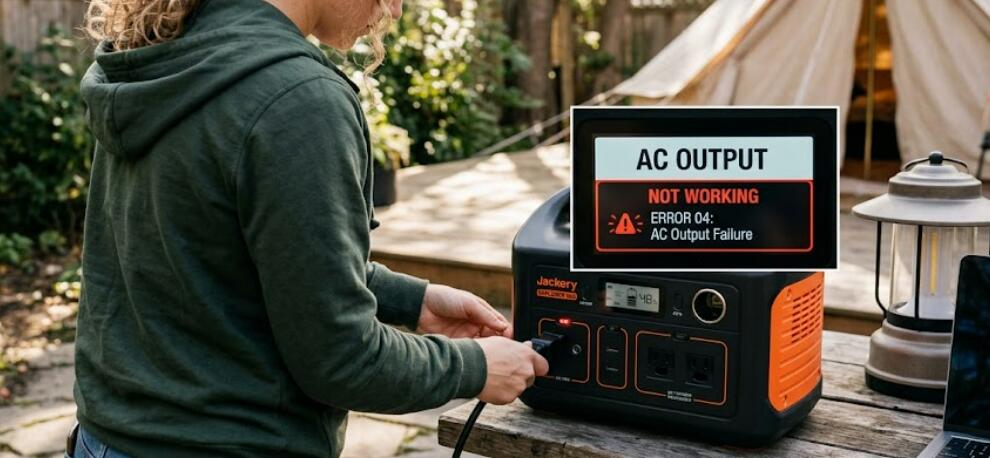
A portable power station is designed to provide reliable electricity for camping trips, emergency backup situations, outdoor events, and mobile workstations. However, one of the most frustrating issues users encounter is when the AC output suddenly stops working. The power station may still charge devices through USB ports or DC outputs, but the AC sockets fail to deliver power to appliances. This problem can occur due to overload protection, battery management system errors, inverter malfunctions, or incorrect operating procedures.
- Read also: How to reset a portable power station?
- How to fix solar charging not working on a portable power station?
Before assuming the unit is permanently damaged, it is important to perform a systematic troubleshooting process. In many cases, the issue can be resolved without professional repair. Understanding how the inverter system, protection circuits, and battery functions operate can help identify the exact cause of the failure. This guide explains the most common reasons why the AC output stops working and provides practical solutions to restore proper functionality.
Check Whether the AC Output Is Turned On
Many portable power stations require users to manually activate the AC inverter by pressing a dedicated AC button. If the AC mode is not enabled, the outlets will not provide electricity even when the battery is fully charged. Look for an indicator light or display icon that confirms the AC output is active.
Press and hold the AC power button for several seconds if necessary. Some models have a delay before activation. After turning it on, test the outlet again using a simple appliance such as a lamp or phone charger.
Inspect for Overload Protection
Portable power stations include overload protection systems to prevent damage when connected devices exceed the inverter’s wattage limit. If you plug in a high-power appliance such as a heater, microwave, or electric kettle, the system may automatically disable the AC output.
- Disconnect all connected devices.
- Turn the power station off completely.
- Wait several minutes before restarting it.
- Reconnect only low-power electronics for testing.
If the AC output works again after removing heavy appliances, the issue was likely caused by overload protection.
Verify the Battery Charge Level
Low battery voltage can also disable AC functionality. Some power stations continue supporting USB charging while shutting down the inverter to conserve energy. Check the battery percentage on the display screen.
If the battery is below 10% or near empty, recharge the unit fully before testing the AC outlets again. Using the original charging adapter is recommended because incompatible chargers may not restore proper operating voltage.
Reset the Portable Power Station
Software glitches and temporary battery management system errors can interrupt inverter operation. Performing a full reset often restores normal function.
Different brands use different reset methods, but common procedures include:
- Holding the main power button for 10 to 15 seconds.
- Turning the device off and unplugging all accessories.
- Allowing the unit to sit unused for several minutes.
- Reconnecting the charger before restarting.
Consult the product manual for the manufacturer’s exact reset instructions.
Examine the AC Outlet for Physical Damage
Damaged AC sockets may prevent electrical contact. Carefully inspect the outlets for signs of burning, discoloration, looseness, or debris accumulation. Dirt, dust, and moisture can interfere with safe operation.
If debris is visible, use dry compressed air or a soft brush to clean the area gently. Never insert metal tools into the socket. If you notice melted plastic or a burnt smell, discontinue use immediately because the inverter components may have been damaged internally.
Test With Different Devices and Cables
Sometimes the issue is not the power station itself but the connected appliance or charging cable. Test multiple low-power devices to determine whether the problem is isolated.
- Try another appliance with low wattage.
- Use a different power cable.
- Check whether the appliance works on a normal wall outlet.
- Avoid devices with surge-heavy startup requirements.
This process helps confirm whether the AC inverter is actually malfunctioning.
Check for Overheating Problems
Most portable power stations contain temperature protection systems. If the internal temperature becomes too high, the inverter automatically shuts down to protect the battery and circuitry.
Move the unit to a cool and well-ventilated location. Allow it to cool down for at least 30 minutes before turning the AC output back on. Ensure the cooling vents are not blocked during operation.
Update Firmware if Supported
Some modern portable power stations support firmware updates through mobile applications or computer software. Outdated firmware can occasionally cause inverter communication issues or false protection errors.
Visit the manufacturer’s official support page to check for firmware updates and installation instructions. Follow the update process carefully to avoid software corruption.
When Professional Repair Is Necessary
If none of the troubleshooting methods restore the AC output, the inverter module or internal battery management system may require professional service. Internal repairs can involve high-voltage components and should not be attempted without proper technical training.
Contact the manufacturer’s support team if the unit is still under warranty. Provide details about the symptoms, error codes, connected appliances, and troubleshooting steps already performed. This information can help technicians diagnose the issue more efficiently.
Conclusion
AC output failures on portable power stations are often caused by overload protection, low battery voltage, overheating, or temporary software glitches rather than permanent hardware damage. By checking the inverter settings, resetting the system, testing compatible devices, and ensuring proper ventilation, many users can restore AC functionality quickly and safely.
Regular maintenance and responsible usage can also reduce the likelihood of future inverter problems. Avoid exceeding the rated wattage, keep the unit clean and dry, and recharge the battery periodically during storage. With proper care and troubleshooting, a portable power station can continue delivering dependable backup power for many years.


